
Blog Post Options
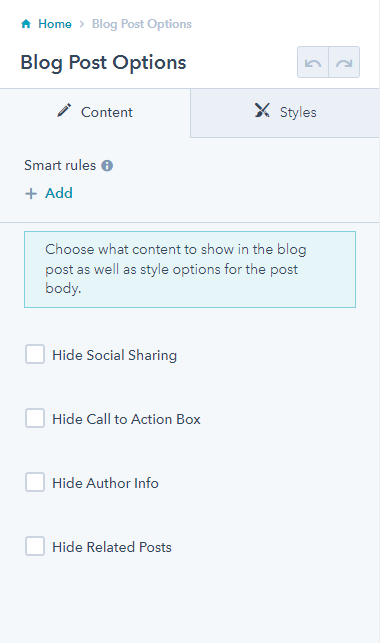
Choose what content to show in the blog post as well as style options for the post body.
Note: This is a built-in module, meaning you’ll need to open the Contents tab of the page editor sidebar to select it. This module is made specifically to alter content on this theme’s Blog Post template and does not render any visible content itself.
Content
- Show/hide social sharing, call to action, author, and/or related posts
Styles
- Adjust quote accent styles
How to Use This Module
The Blog Post Options module serves as your control center for customizing individual blog posts within the Brightlane theme. Unlike standard drag-and-drop modules that add visible content blocks, this module functions behind the scenes to give you granular control over your blog post layout and functionality.
You’ll find this module most valuable when you need to tailor specific blog posts for different audiences or campaign goals. For instance, you might want to disable social sharing on internal company announcements while keeping it enabled for thought leadership pieces, or remove the call-to-action section from posts that already contain embedded forms or contact information.
The author display toggle is particularly useful for agencies or companies with multiple contributors. You can showcase expert authors for industry insights while hiding bylines for more general company updates. Similarly, the related posts feature works best when you have a substantial blog archive—disable it for newer sites where suggested posts might not be relevant.
Pro tip: The quote accent styling options help maintain brand consistency across your content. If your blog posts frequently include customer testimonials or industry quotes, customize these styles to match your brand colors and typography for a more cohesive visual experience.
Since this module only affects the Blog Post template, you won’t see any changes when editing other page types. Remember to publish your changes after adjusting settings, as modifications won’t appear on live blog posts until you save and publish the page. The module settings apply globally to all blog posts using the Brightlane Blog Post template, so consider your overall content strategy when making adjustments.