
Blog Slider
A multi-slide slider to dynamically display blog posts.
Note: The section this module is added to should have its Content Alignment set to Full width.
View a live demo of this module.
Content
- Adjust the text of the heading to the left
- Choose to show recent posts, popular posts, recent posts that have a particular tag, or manually selected posts
- By default, this module pulls from the portal’s default blog, but you can choose to pull from any blog in your portal
- Change heading level of post titles
- Show/hide summary, tags, author, date, and read time
- Change read more button style
- Adjust the number of posts displaying at once
- Edit screen reader text for slider (next button, previous button, pagination, etc)
Styles
- Set Light Mode
- Set slider type (slide, loop, rewind)
- Adjust arrow color
- Show/hide text of inactive slides
- Adjust the color of active slide shadows
- Adjust slide corner radius
- Change the slide post style [+ only]
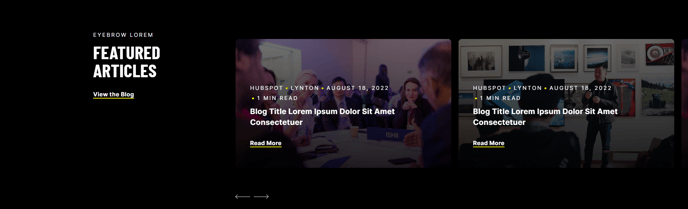
Usage Guide
The Blog Slider module is designed to showcase your most compelling blog content in an engaging, interactive format that encourages visitors to explore multiple posts. This module works particularly well on your homepage, service pages, or dedicated blog landing pages where you want to highlight relevant content without overwhelming visitors with a traditional blog listing.
When adding this module to your page in the HubSpot page editor, always place it within a full-width section to ensure the slider displays properly across all screen sizes. The module’s responsive design adapts seamlessly to desktop, tablet, and mobile devices, maintaining visual appeal and functionality on every viewport.
Strategic placement recommendations: Use the Blog Slider near the top of your homepage to immediately demonstrate thought leadership, or position it on service pages to showcase case studies and insights related to specific offerings. For event companies, this module excels at highlighting recent event recaps or upcoming event announcements.
The post filtering options give you powerful control over content curation. Recent posts work well for active blogs, while manually selected posts allow you to create themed collections like “client success stories” or “industry insights.” The tag-based filtering is particularly valuable for B2B companies wanting to display content relevant to specific industries or services.
Accessibility considerations are built into the module’s design. The customizable screen reader text ensures your slider remains navigable for users with assistive technologies, while the keyboard navigation support maintains compliance with web accessibility standards.
For optimal performance, limit the number of displayed posts to 3-5 slides to prevent overwhelming visitors while maintaining fast loading speeds across all devices.