
Counter
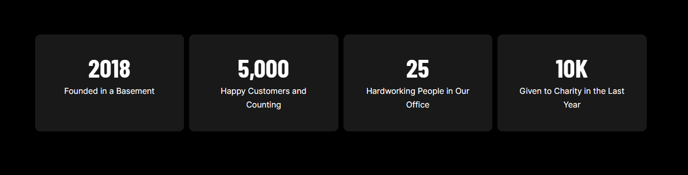
Animated numerical stats that count up to the desired number.
View a live demo of this module.
Content
- Include FontAwesome or custom icon above stat
- Customize number with thousand separators, suffix and prefix text, and animation speed
- Set the start and end numbers and the labels for the counters
Styles
- Set Light Mode
- Edit counter borders and background color
- Edit module padding
- Change text alignment
- Change max height of icons
- Change color of icons (only applicable to FontAwesome icons)
About This Module
The Counter module is designed to showcase key statistics, achievements, and metrics in an eye-catching animated format that draws visitor attention to your most important numbers. This module works exceptionally well on homepage hero sections, about pages, and landing pages where you want to highlight company milestones, client success metrics, or industry statistics.
When you drag the Counter module from the page editor sidebar onto your page, you can create multiple animated counters within a single module instance. This makes it perfect for displaying related statistics side-by-side, such as “Years in Business,” “Happy Clients,” and “Projects Completed” in a professional services context.
Best practices for the Counter module:
-
Choose meaningful numbers that reinforce your value proposition. Instead of generic statistics, use specific metrics that differentiate your business, like “847 Events Managed” rather than just “Experienced Team.”
-
Position strategically on high-traffic pages. The animation triggers when visitors scroll to the module, so place it where users will naturally pause to read, typically in the upper half of landing pages or immediately after your main value proposition.
-
Leverage the prefix and suffix options to add context to your numbers. Use symbols like ”+” for “500+ Projects” or ”%” for conversion rates to make the statistics more immediately understandable.
-
Maintain visual consistency by using the Light Mode setting when placing the module on darker page sections, and adjust the icon colors to match your brand palette through the Brightlane theme settings.
The Counter module integrates seamlessly with HubSpot’s responsive framework, automatically adjusting counter layouts and text sizing across desktop, tablet, and mobile devices without requiring additional configuration.