
Featured Events Slider [+ only]
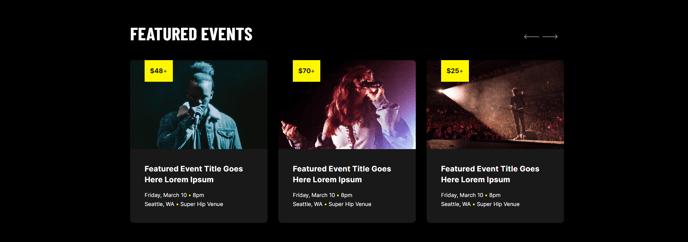
A list of event cards with thumbnails displayed as a slider.
View a live demo of this module.
Content
- Include a heading
- Add as many event slides as you want. Each slide can contain:
- A tag overlaying the thumbnail
- A thumbnail image
- A link
- Text content
- Details separated into lines, further separated by bullet characters
- Custom colors on the tag
- Configure the number of slides to show on different devices
- Configure the accessible text for the slider controls
Styles
- Set Light Mode for both the module and slides
- Change the slider type
- Change background color of slides
- Change arrow color and hover color
- Change pagination active and inactive color
- Change slide spacing and border radius
- Add a glow effect on hover
Usage Guide
The Featured Events Slider is designed to showcase your upcoming events, conferences, webinars, or workshops in an engaging carousel format. This module works particularly well on your homepage, dedicated events landing pages, or industry-specific service pages where you want to highlight relevant upcoming activities.
When adding this module through the HubSpot page editor’s drag-and-drop interface, you’ll find it most effective when placed in prominent sections like hero areas or featured content zones. The slider format allows you to display multiple events without overwhelming the page layout, making it ideal for organizations that regularly host various types of events.
Best practices for content creation: Upload high-quality thumbnail images that are consistently sized (the theme will handle responsive scaling automatically). Use the tag overlay feature to categorize your events—for example, “Webinar,” “Conference,” or “Workshop”—which helps visitors quickly identify event types. The detail lines work well for displaying key information like dates, locations, or pricing in a scannable format.
Styling considerations: Take advantage of the Light Mode option when placing this module over dark backgrounds or hero images. The glow effect on hover adds a professional touch that aligns with Brightlane’s conversion-focused design philosophy. Configure slide spacing to match your overall page layout—tighter spacing works well for content-heavy pages, while generous spacing creates a more premium feel.
Remember to link each event slide to dedicated event detail pages or registration forms to maximize conversions. The module’s responsive settings ensure your events display optimally across all devices, automatically adjusting the number of visible slides based on screen size.