
Featured Speaker
A large image and text for displaying the details of a speaker or person.
View a live demo of this module.
Content
- Add an image
- Add text with a speaker name/title callout
- Add social media icons
- Add up to 2 calls to action
- Change image placement (left or right)
Styles
- Set Light Mode
- Add “scanline” background style
- Add animation to image
- Change text alignment
- Customize list styling
- Customize icon styling
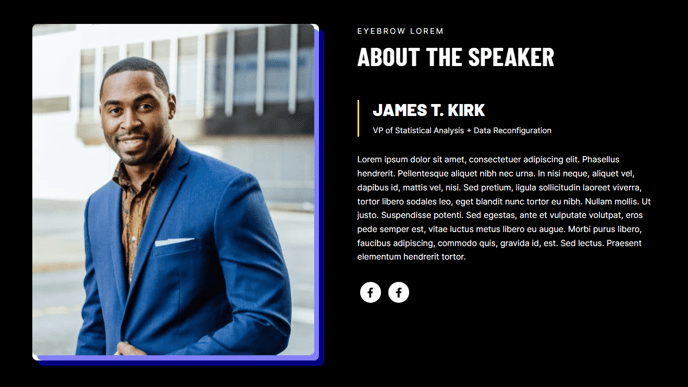
How to Use the Featured Speaker Module
The Featured Speaker module is designed to showcase key presenters, team members, or industry experts with visual prominence on your pages. This module works exceptionally well on event landing pages, conference websites, speaker bureau pages, and team introduction sections where you need to highlight individual expertise and credibility.
When adding this module through the HubSpot page editor’s drag-and-drop interface, you’ll find it creates an impactful two-column layout that balances professional photography with comprehensive speaker information. The module’s flexibility allows you to adapt the visual hierarchy to match your page flow by switching the image placement between left and right positions.
For optimal results, use high-resolution headshots or professional photos that maintain quality when displayed at the module’s large size. The social media integration is particularly valuable for event pages, as attendees can easily connect with speakers on LinkedIn, Twitter, or other platforms directly from your site.
The dual call-to-action capability makes this module versatile for different conversion goals. You might use one CTA for “View Speaker Bio” linking to a detailed page, while the second could drive “Register for Event” or “Schedule a Consultation” actions. This approach works especially well when the featured speaker serves as both a credibility indicator and conversion driver.
Pro tip: The Light Mode styling option helps this module stand out against darker page backgrounds, while the scanline effect adds visual interest without overwhelming the content. When using multiple Featured Speaker modules on the same page, consider alternating the image placement to create visual rhythm and prevent a repetitive layout that could reduce engagement.