
Hero - Countdown
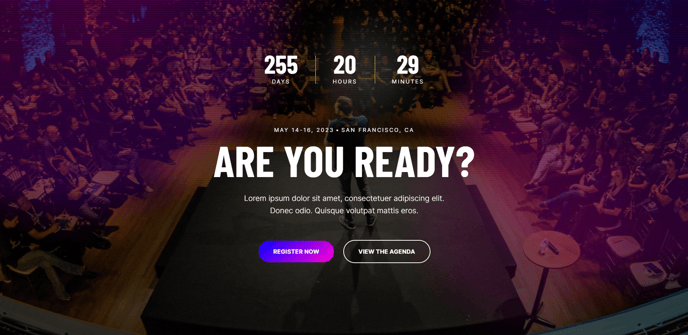
Full-width hero with option to add a countdown timer.
Note: The section this module is added to should have its Content Alignment set to Full width.
View a live demo of this module.
Content
- Set timer target time
- Set an action to occur when the timer is complete (none, redirect, show text)
- Set the smallest unit of time that should be displayed (days, hours, minutes, seconds)
- Edit labels for units of time in the countdown
- Include heading, text, and calls to action
Styles
- Set Light Mode
- Add “scanline” background style
- Add background base layer that can be optionally blurred
- Change background for both desktop and mobile (color, gradient, background)
- Edit module padding
- Change text alignment
- Customize list styling
- Adjust countdown timer colors and sizes
- Change heading size
Usage Guide
The Hero - Countdown module is designed to create urgency and drive conversions for time-sensitive campaigns, event registrations, product launches, or limited-time offers. This full-width hero section combines compelling messaging with a dynamic countdown timer that automatically updates in real-time, making it perfect for landing pages, event pages, and promotional campaigns.
When adding this module to your page in the HubSpot page editor, you’ll want to drag it into a section configured for full-width content alignment to achieve the intended visual impact. The module works exceptionally well as the first element on landing pages where you need to immediately capture visitor attention and communicate time sensitivity.
The countdown functionality goes beyond simple time display—you can configure specific actions to trigger when the timer reaches zero. This might include redirecting visitors to a thank-you page, displaying a “sold out” message, or showing alternative content. This automation reduces manual content updates and ensures your page remains relevant throughout your campaign lifecycle.
Pro tip: Consider the psychological impact of your smallest time unit setting. Displaying seconds creates more urgency than stopping at minutes, while showing only days and hours feels less pressured—choose based on your campaign goals and audience expectations.
The module’s styling options allow you to match your brand while maintaining the conversion-focused design principles built into Brightlane. The scanline background effect can add visual interest for tech or event-focused campaigns, while the background blur option helps ensure text readability over busy background images. Test different combinations of background treatments and text alignment to optimize for your specific content and conversion goals.