
Pricing Boxes
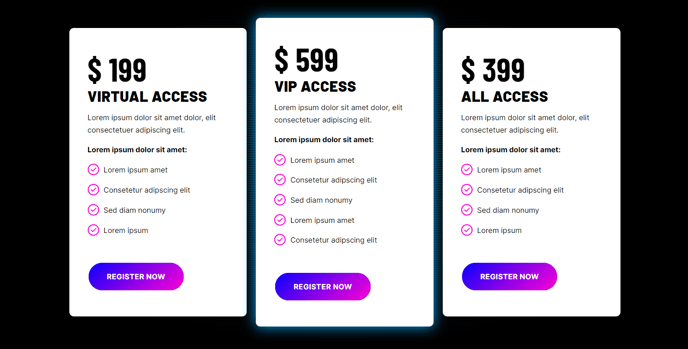
Informational boxes for product pricing.
View a live demo of this module.
Content
- Changes number of boxes to show per row
- Create boxes with price details, information, and calls to action
Styles
- Set Light Mode
- Add “scanline” background style
- Change text alignment
- Add a glow effect on box hover
- Edit background, border, and box-shadow of pricing boxes
- Edit border and featured heading of featured boxes
Usage Guide
The Pricing Boxes module is designed specifically for showcasing multiple pricing tiers, service packages, or product comparisons on your HubSpot pages. This module works exceptionally well on dedicated pricing pages, service landing pages, and homepage sections where you need to present clear pricing options to potential customers.
When adding this module through the HubSpot page editor’s drag-and-drop interface, you’ll find it particularly effective for SaaS pricing tiers, event ticket options, or service package comparisons. The module’s conversion-focused design aligns with Brightlane’s professional aesthetic, making it ideal for B2B sales pages and consultation booking funnels.
Best practices for content editors:
Configure your featured box to highlight your most popular or recommended option—this draws visitor attention and can significantly improve conversion rates. The featured styling includes enhanced borders and headings that make your preferred choice stand out visually.
For optimal mobile responsiveness, test different box-per-row configurations in the HubSpot preview mode. While three boxes work well on desktop, consider how they’ll stack on mobile devices to ensure readability isn’t compromised.
The scanline background effect pairs particularly well with technology or digital service offerings, while the clean light mode works better for traditional professional services. You can preview these style combinations using the theme’s live demo before implementing them on your actual pages.
Page type recommendations: This module performs best on landing pages with clear conversion goals, pricing-specific website pages, and campaign-focused pages where visitors expect to see pricing information. Avoid using it on blog posts or informational content where pricing details might feel out of place.