
Showcase Slider
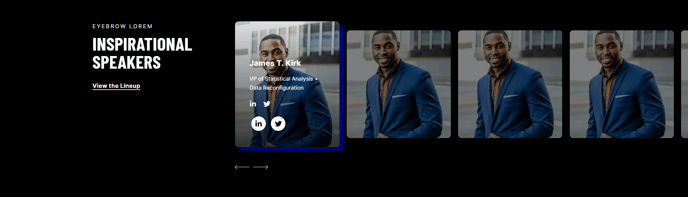
A multi-slide slider with an image and title to showcase people or events.
Note: The section this module is added to should have its Content Alignment set to Full width.
View a live demo of this module.
Content
- Include heading
- Change number of slides to show at a time on desktop, laptop, tablet, and mobile
- Edit screen reader text for slider (next button, previous button, pagination, etc)
Styles
- Set Light Mode
- Change heading alignment
- Set slider type (slide, loop, rewind)
- Change slider arrow and arrow hover color
- Edit space between slides
- Show/hide text of inactive slides
- Change aspect ratio and hover animation of images
- Change shadow color for active slide
How to Use This Module
The Showcase Slider is ideal for highlighting team members, speakers, featured clients, or event attendees on your professional services website. This module works particularly well on About pages, speaker lineups for events, or dedicated team pages where you want to create an engaging, visual introduction to key people.
When adding this module to your page through the HubSpot page editor, you’ll need to ensure the containing section is set to full width for optimal display. The slider automatically adapts to different screen sizes, so you can customize how many slides appear simultaneously on desktop (typically 3-4), laptop (2-3), tablet (2), and mobile (1) for the best user experience.
Content Strategy Tips: Keep your slide titles concise and consistent in format. If showcasing team members, use job titles or brief descriptors. For events, include speaker names and company affiliations. The image aspect ratio setting helps maintain visual consistency across all slides, which is crucial when displaying headshots or event photos of varying dimensions.
Design Considerations: The light mode setting is particularly useful when placing this module on darker page backgrounds, ensuring proper contrast and readability. The hover animation adds polish to your presentation – subtle animations work best for professional services sites to maintain credibility while adding visual interest.
This module integrates seamlessly with the Brightlane theme’s conversion-focused design philosophy. Use it strategically on landing pages to build trust through social proof, or on service pages to introduce the team behind your expertise. The accessibility features, including customizable screen reader text, ensure your showcase remains inclusive while maintaining the professional aesthetic your B2B audience expects.