
Tabbed Content
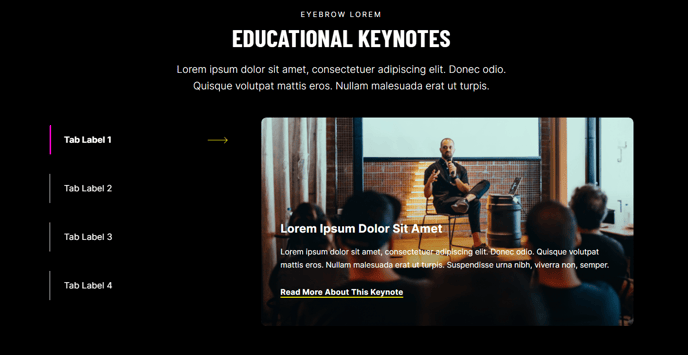
Tabular content that can contain text, a call to action, an image, and/or a form.
View a live demo of this module.
Content
- Include a heading
- Change orientation of navigation (horizontal or vertical)
- Add rows and columns to your tab content
- Add card background to tab content
- Change vertical alignment of rows
- Change max width of rows
- Change width of columns
Modules
- Set Light Mode
- Add “scanline” background style
- Change heading alignment
- Customize form styling
- Use an alternate style for horizontal tabs [+ only]
Usage Guide
The Tabbed Content module is ideal for organizing complex information into digestible sections while maintaining a clean page layout. This module works particularly well on service pages where you need to present multiple offerings, product comparison pages, or resource hubs where visitors can quickly navigate between related topics without scrolling through lengthy content.
When adding this module through the HubSpot page editor, you’ll find it most effective on landing pages, service detail pages, and hub pages where user engagement and information hierarchy are crucial. The module’s conversion-focused design aligns with Brightlane’s B2B and professional services focus, making it perfect for presenting pricing tiers, service packages, or event schedules.
Best practices for implementation: Start with your most important content in the first tab, as this will be visible by default. Use descriptive tab labels that clearly indicate what visitors will find in each section. The vertical navigation option works especially well on mobile devices and when you have longer tab labels, while horizontal tabs are ideal for desktop-focused experiences with concise labels.
The card background option adds visual separation that’s particularly useful when your tabs contain forms or call-to-action buttons, helping draw attention to conversion elements. When combining text with forms in your tab content, consider using the column layout options to create side-by-side arrangements that feel more engaging than stacked content.
For optimal performance, limit yourself to 3-5 tabs to prevent decision paralysis. The module integrates seamlessly with HubSpot’s form builder, allowing you to create different lead magnets or contact forms within each tab while maintaining consistent styling across your theme.