
Team Listing
List out team members with their name, title, social links, and profile image.
View a live demo of this module.
Content
- Include a heading and/or call to action
- Change how many team members to show per row
- Change social placement (top, right, bottom, left)
Styles
- Set Light Mode
- Change heading alignment
- Change aspect ratio of image
- Change text alignment
- Customize icon styling (color, hover color, enclose)
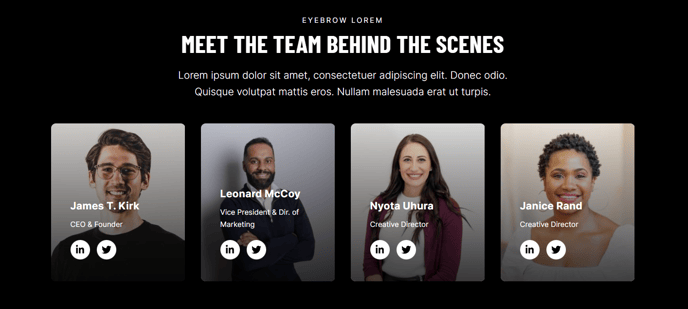
Usage Guide
The Team Listing module is designed to showcase your organization’s key personnel in a professional, visually appealing format that builds trust with potential clients. This module works particularly well on About Us pages, leadership pages, and dedicated team pages where you want to humanize your brand and demonstrate expertise.
When adding this module through the HubSpot page editor, you’ll find it especially effective for professional services firms looking to highlight their credentials, event companies showcasing their planning team, or B2B organizations introducing decision-makers to potential partners. The module’s clean design aligns perfectly with Brightlane’s conversion-focused approach, ensuring your team presentation doesn’t distract from your primary business objectives.
Best practices for implementation: Configure the team members per row based on your team size—use 3-4 columns for larger teams to maintain readability, or 2 columns for executive teams where you want more prominent individual profiles. The social link placement options allow you to match your brand’s social media strategy; bottom placement works well for conservative professional services, while side placement creates a more modern, accessible feel.
The aspect ratio settings deserve special attention since consistent imagery strengthens your professional appearance. Choose square ratios for a modern look or rectangular for more traditional business portraits. If your team photos vary in quality or style, the Light Mode setting can help create visual consistency across different images.
Consider pairing this module with a text module above it to provide context about your company culture or team philosophy, and always ensure social links lead to professional profiles that reinforce your brand message.