
Theme Buttons
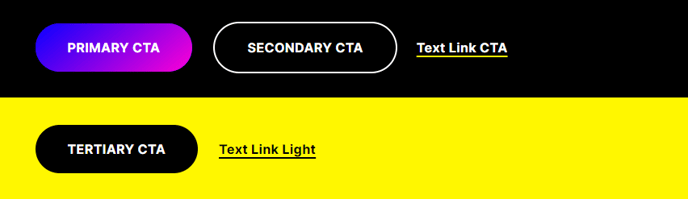
Custom call to action buttons.
View a live demo of this module.
Content
- Add as many buttons as you need
- Select a color for each call to action from button colors set in your Theme Settings (Primary, Secondary, Tertiary, Text Link)
- Change alignment of the buttons on the page (left, center, right)
Styles
- Set Light Mode (only applicable to arrow and text link)
- Add “scanline” background style
How to Use This Module
The Theme Buttons module is designed to create compelling call-to-action sections that drive conversions on your professional services or B2B website. Unlike standard HubSpot buttons, this module gives you the flexibility to group multiple CTAs together while maintaining visual consistency with your Brightlane theme’s design system.
When to Use This Module
This module works particularly well on landing pages where you need to present multiple action options, such as “Download Whitepaper” and “Schedule Consultation” buttons side by side. It’s also effective on service pages where you want to offer different engagement levels, or on event pages where attendees need options like “Register Now” and “Learn More.”
Setup and Configuration
After dragging the Theme Buttons module into your page editor, you’ll find that each button automatically inherits the styling you’ve configured in your Theme Settings under Design Tools. The Primary button color typically works best for your main conversion goal, while Secondary and Tertiary options help establish visual hierarchy for supporting actions.
The alignment options become particularly useful when placing this module in different page sections. Center alignment works well in hero sections or standalone CTA blocks, while left alignment integrates seamlessly within content areas alongside text modules.
Pro Tips
The scanline background style adds a subtle animated effect that can increase attention without being distracting—ideal for high-priority conversion sections. When using Light Mode for arrow and text link styles, ensure you’re placing the module on darker background sections for optimal contrast and readability.
Consider limiting yourself to 2-3 buttons maximum to avoid decision paralysis for your visitors.