
Timeline
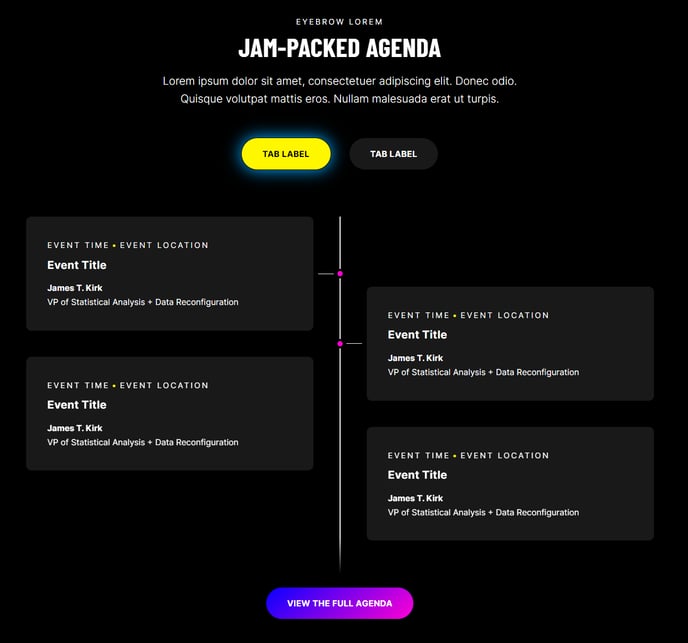
An animated listing of events.
View a live demo of this module.
Content
- Include heading
- Change heading level for events
- Add as many tabs as you need, each with their own set of events
- Show/hide details for each event
- Include a call to action
Styles
- Set Light Mode
- Add “scanline” background style
- Add glow effect on active events
- Change colors for event backgrounds, connecting lines, and dots
- Change borders for events
- Change heading alignment
Usage Guide
The Timeline module is perfect for showcasing your company’s history, product development milestones, event schedules, or project phases in a visually engaging format. This module works exceptionally well on About Us pages, service process explanations, and event landing pages where you need to communicate a sequence of events or achievements.
When adding the Timeline module to your pages through the HubSpot page editor, you’ll find it particularly effective on full-width sections where the animated elements have room to breathe. The module’s tabbed functionality allows you to organize different timelines – for example, you could create separate tabs for “Company History,” “Product Roadmap,” and “Upcoming Events” all within the same module instance.
Pro tip: The scanline background style works beautifully when you want to create a tech-forward or modern aesthetic that aligns with Brightlane’s clean design philosophy. Pair this with the glow effect to make active timeline events stand out as visitors scroll through your content.
For optimal user experience, consider enabling event details selectively – use them for complex milestones that need explanation, but keep simple date announcements brief. The call-to-action feature at the bottom of your timeline is ideal for converting timeline browsers into leads, especially when placed on service process pages where you can direct visitors to schedule consultations.
The Timeline module automatically adapts to your theme’s typography settings, but you can customize heading levels to maintain proper page hierarchy. This is particularly important for SEO when your timeline appears alongside other content modules on the same page.