
Hero - Form
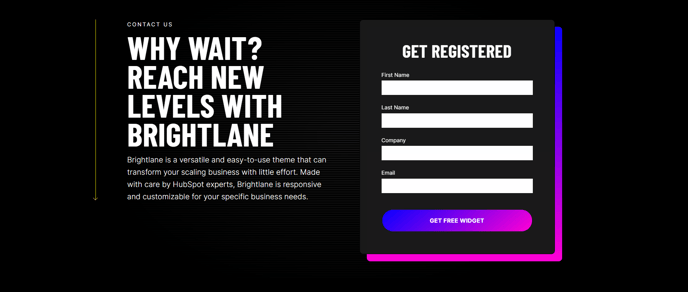
Two column hero with text on the left and a form on the right.
View a live demo of this section.
Modules
Usage Guide
The Hero - Form section is designed to maximize lead generation by combining compelling messaging with immediate conversion opportunities. This section places your primary value proposition prominently on the left while capturing visitor information through a strategically positioned form on the right, creating an ideal balance between communication and conversion.
When adding this section to your pages through the HubSpot page editor, you’ll find it works exceptionally well as the first section visitors see on landing pages, service pages, and campaign-specific pages. The two-column layout automatically adapts to mobile devices, stacking the content vertically to maintain readability and form usability on smaller screens.
Best practices for implementation:
Use concise, benefit-focused headlines in the left column that directly relate to what the form offers. The Hero - 2 Column module allows you to customize heading styles, body text, and call-to-action buttons to match your brand voice and campaign goals.
For the form component, consider using HubSpot’s smart forms to show different fields to returning visitors, or progressive profiling to gather additional information over time. You can easily connect any HubSpot form to this section through the module settings in the page editor.
When to choose this section over alternatives:
Select the Hero - Form section when lead generation is your primary page objective, rather than purely informational content. It’s particularly effective for webinar registrations, consultation requests, and resource downloads where you need immediate visitor engagement.
The Brightlane theme’s conversion-focused design ensures proper spacing, visual hierarchy, and form styling that encourages completion while maintaining the professional appearance your B2B audience expects.