
Horizontal Tabs [+ only]
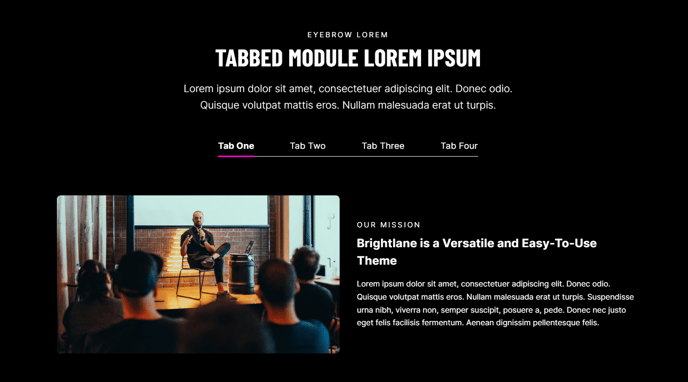
Tabbable content section with the tabs arranged horizontally.
View a live demo of this section.
Modules
Usage Guide
The Horizontal Tabs section provides an elegant way to organize multiple content blocks into a space-efficient tabbed interface, perfect for showcasing services, features, or product information without overwhelming your visitors. This section works particularly well on service pages, product overviews, and resource hubs where you need to present detailed information in digestible chunks.
When you add this section to your page through HubSpot’s drag-and-drop page editor, you’ll find it especially useful for comparison content or step-by-step processes where visitors benefit from switching between related topics. The horizontal layout makes it ideal for desktop viewing, as the tab labels remain clearly visible and accessible across the top of the content area.
Best practices for implementation:
- Keep tab labels concise (2-4 words) to maintain clean horizontal spacing
- Use consistent content structure within each tab to create a cohesive user experience
- Consider this section for pages where vertical space is limited but you have substantial content to display
- Place important or primary information in the first tab, as it will be visible by default
The section integrates seamlessly with Brightlane’s conversion-focused design, maintaining proper spacing and typography that aligns with your overall page layout. You can customize the styling through the theme’s design settings to match your brand colors and ensure the tabs complement other page elements.
For mobile devices, the tabbed content automatically adapts to provide an optimal viewing experience, though you may want to preview your content on different screen sizes to ensure readability across all devices.