
Two Column - Image Right
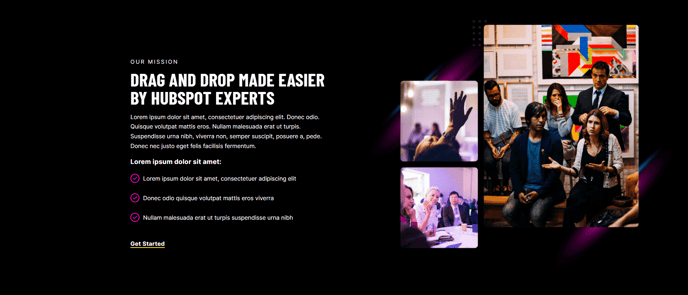
Two columns with text on the left and image on the right.
View a live demo of this section.
Modules
Usage Guide
The Two Column - Image Right section creates a balanced visual hierarchy that guides visitors from compelling text content to supporting imagery. This layout is particularly effective for service descriptions, about us content, and feature explanations where you need substantial text space while maintaining visual appeal.
When adding this section through the HubSpot page editor’s drag-and-drop interface, you’ll find it works exceptionally well on landing pages, service pages, and company overview sections. The left-aligned text column provides ample space for headlines, descriptions, and call-to-action buttons, while the right-side image reinforces your message without overwhelming the content.
Content Strategy Tips:
- Use high-quality, professional images that complement rather than compete with your text
- Keep headlines concise but descriptive to maintain the clean aesthetic
- Consider using this section to break up longer pages between other full-width sections
The underlying Text and Image Columns module gives you flexibility to adjust spacing, alignment, and mobile responsiveness through the theme’s built-in settings. On mobile devices, the layout automatically stacks with text appearing above the image, ensuring readability across all screen sizes.
This section pairs particularly well with Brightlane’s other conversion-focused elements. Consider following it with a testimonial section or CTA block to maintain momentum toward your desired user action. The clean design ensures your professional services or B2B messaging appears credible and trustworthy, supporting the theme’s conversion-focused architecture.
For optimal results, maintain consistent image dimensions across multiple instances of this section to create visual rhythm throughout your pages.