
Two Column - Text and Form [+ only]
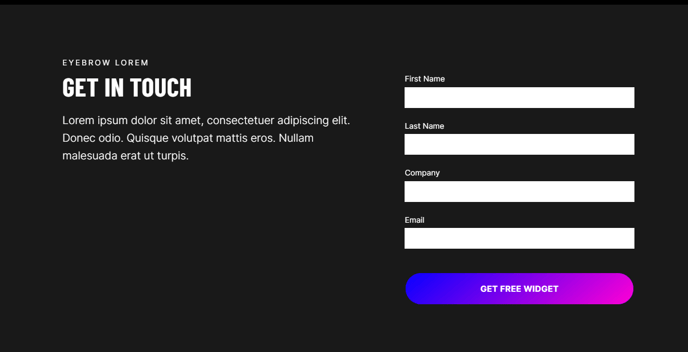
Two columns with text on the left and a form on the right.
View a live demo of this section.
Modules
How to Use This Section
The Two Column - Text and Form section creates a balanced layout that’s ideal for lead generation pages, contact sections, and service inquiries. This section works particularly well when you need to provide context or compelling copy alongside a conversion form, making it perfect for landing pages, service detail pages, and “Contact Us” sections.
When you add this section through the HubSpot page editor’s drag-and-drop interface, you’ll notice the Theme Rich Text module on the left gives you complete flexibility to craft your messaging. You can include headlines, bullet points, testimonials, or detailed service descriptions that help visitors understand the value proposition before filling out your form. This text area supports all standard formatting options and maintains the Brightlane theme’s clean typography automatically.
The Theme Form module on the right integrates seamlessly with HubSpot’s form builder, allowing you to use any existing HubSpot form or create new ones directly within the page editor. The form styling matches Brightlane’s conversion-focused design, with optimized spacing and clear call-to-action buttons that encourage submissions.
Layout Tips:
- Keep your text content concise but compelling—visitors should be able to scan it quickly while the form remains prominently visible
- This section works best when the form has 3-5 fields; longer forms may create visual imbalance with shorter text content
- Consider using this section near the bottom of service pages where visitors are ready to take action after learning about your offerings
The responsive design ensures both columns stack gracefully on mobile devices, with the text appearing above the form to maintain the logical flow of information to conversion.