
Event Detail [+ only]
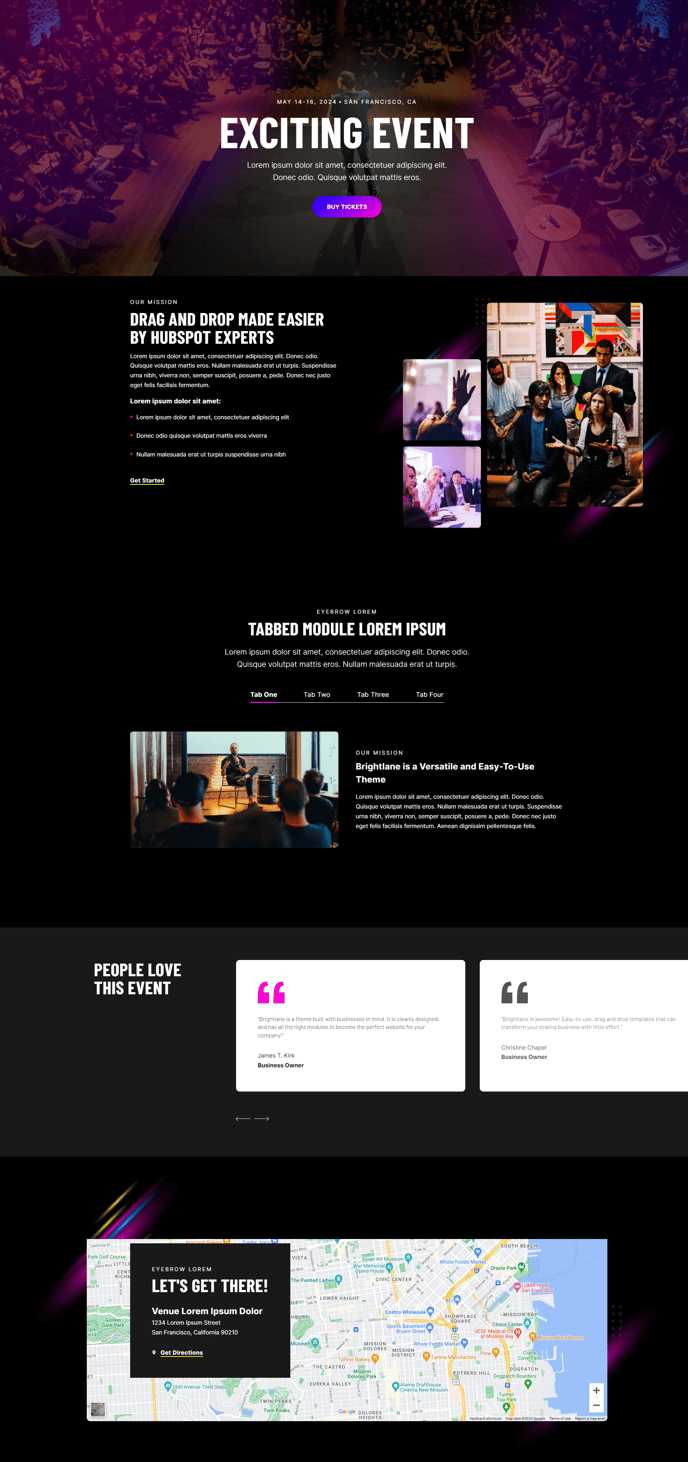
Show details for a specific event using tabs, testimonials, or an embedded map.
Default Sections and Modules
- Back to Top
- Hero - Feature
- Two Column - Image Right
- Horizontal Tabs
- Testimonial Showcase Slider
- Embedded Map
How to Use This Template
The Event Detail template is specifically designed to showcase individual events with maximum conversion potential. Unlike basic event pages, this template combines persuasive storytelling elements with practical event information to drive registrations and attendance.
When setting up your event page in the HubSpot page editor, you’ll notice the template starts with the Hero - Feature section, which serves as your primary conversion point. Use this space to highlight your event’s main value proposition, include registration buttons, and display key details like date, time, and location prominently.
The Two Column - Image Right section works perfectly for presenting your event agenda or speaker information alongside compelling visuals. You can easily swap the image position using the section’s layout controls if you prefer a left-aligned image instead.
The Horizontal Tabs section is particularly powerful for organizing complex event information without overwhelming visitors. Use separate tabs for agenda, speakers, venue details, and FAQs. This keeps your page scannable while providing comprehensive information to serious prospects.
Position the Testimonial Showcase Slider strategically to build social proof from past event attendees. These testimonials work best when they address common objections or highlight specific outcomes attendees achieved.
The Embedded Map section handles venue location seamlessly, reducing friction for attendees trying to find your event. You can customize the map’s zoom level and markers through the module settings.
Pro tip: Use the theme’s global settings to ensure your event branding colors and fonts remain consistent across all sections. The drag-and-drop editor allows you to reorder these sections based on what information is most important for your specific event type.