
Flex
Compilation of several modules for use on inner content pages.
Default Sections and Modules
- Back to Top
- Hero - Simple with Scanline Effect
- Page Navigation
- Two Column - Image Right
- Two Column - Image Left
- Tabs
- Masonry Gallery
- Simple Text with Image
- Call to Action Box
- FAQ
- Blog Slider
- Simple Form
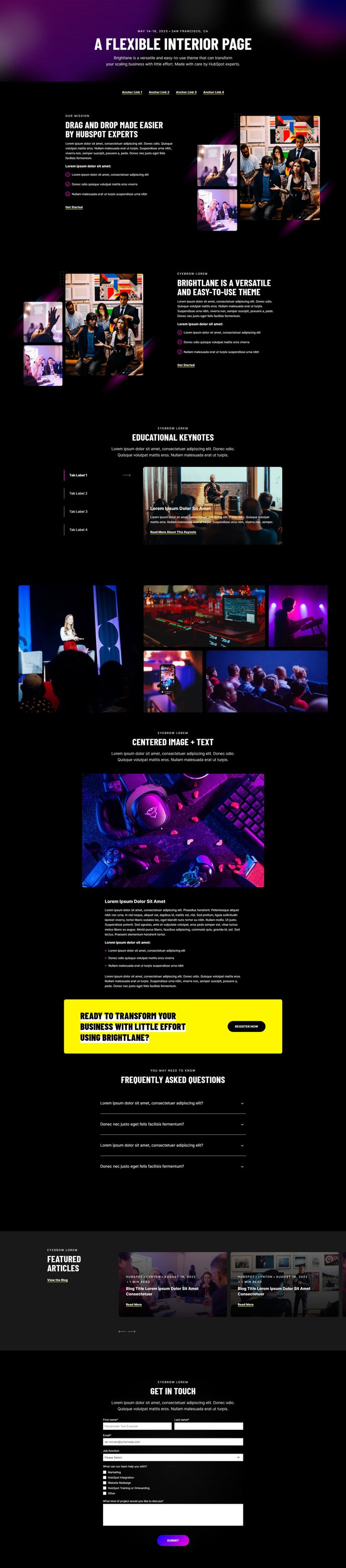
How to Use the Flex Template
The Flex template serves as Brightlane’s most versatile content page layout, designed specifically for creating comprehensive inner pages that need multiple content types and interactive elements. Unlike single-purpose templates, the Flex template combines Brightlane’s most popular sections into one cohesive page structure, making it ideal for detailed service pages, product showcases, or comprehensive resource hubs.
When you create a new page using the Flex template in HubSpot’s page editor, you’ll immediately have access to twelve pre-configured sections that work seamlessly together. This eliminates the guesswork of selecting compatible modules and ensures consistent styling across your entire page. The template’s modular approach means you can easily drag and drop sections to reorder them or remove sections you don’t need without affecting the overall page structure.
Best use cases for the Flex template include detailed service pages where you need to explain complex offerings, event landing pages that require multiple content formats, or comprehensive about pages that showcase your company’s story, team, and capabilities. The combination of visual elements like the Masonry Gallery and interactive features like Tabs makes this template particularly effective for B2B companies that need to present technical information in an engaging way.
To get started, simply select the Flex template when creating a new page in HubSpot, then customize each section’s content through the page editor. You can modify colors, fonts, and spacing through your theme settings to match your brand, while the drag-and-drop interface allows you to rearrange sections based on your content strategy. The Hero section with scanline effect creates an immediate professional impression, while the Call to Action Box and Simple Form sections help drive conversions throughout the page.