
Resource Listing [+ only]
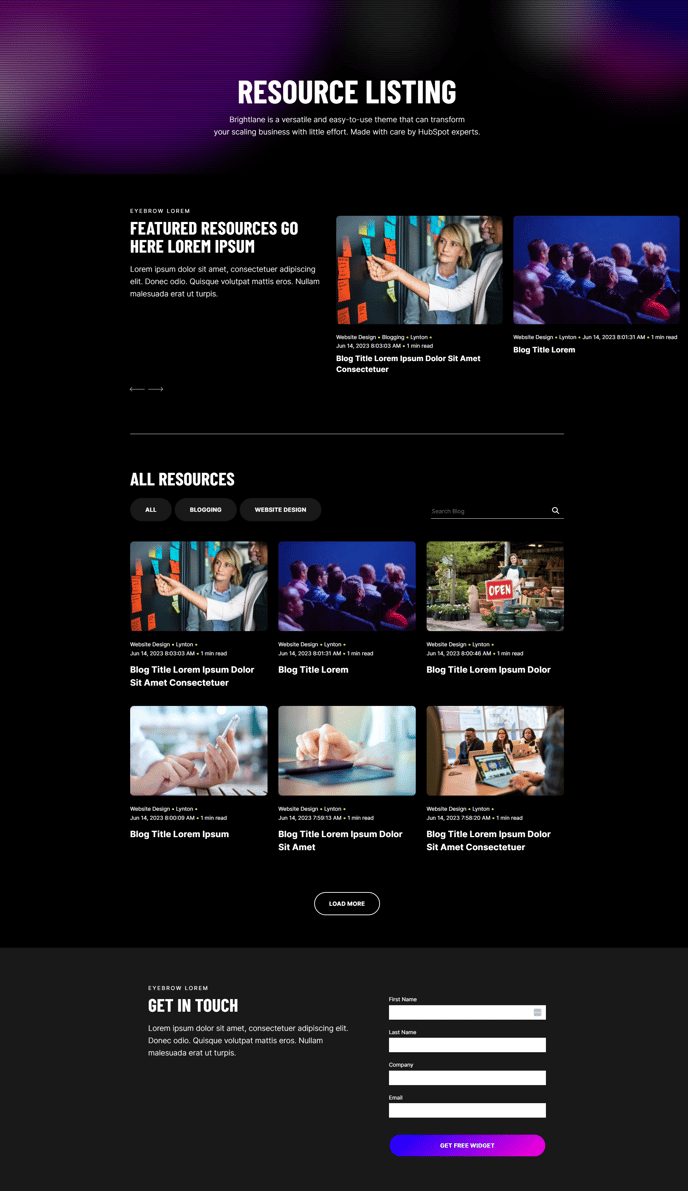
A filterable, searchable, infinite-load blog listing topped by a simple hero and a post slider.
Note: Read this HubSpot knowledge base article for a guide on applying template to your blog listing and editing the listing page.
Default Sections and Modules:
- Back to Top
- Hero - Simple with Scanline Effect
- Blog Slider
- Theme Divider
- Theme Rich Text
- Blog Listing
- Two Column - Text and Form
Usage Guide
The Resource Listing template is specifically designed for organizations that publish high volumes of educational content, case studies, whitepapers, and other resources. Unlike standard blog templates, this template prioritizes content discoverability through its robust filtering and search capabilities, making it ideal for companies with extensive content libraries.
Setting up your Resource Listing page starts in the HubSpot page editor. After applying this template to a new page, you can customize the hero section to introduce your resource library with compelling copy that encourages exploration. The scanline effect adds visual interest while maintaining the professional aesthetic that B2B audiences expect.
The blog slider section serves as a content showcase for your most important or recent resources. Configure this in the drag-and-drop editor to highlight featured content, ensuring visitors immediately see your best material. You can manually select specific posts or set it to automatically display recent content based on your blog tags.
Optimizing the filtering experience requires thoughtful blog tag organization. The filterable blog listing module works best when your content is consistently tagged with relevant categories like “Case Studies,” “Whitepapers,” or “Industry Reports.” This allows visitors to quickly narrow down content to their specific interests.
The infinite-load functionality keeps visitors engaged by seamlessly loading more content as they scroll, reducing bounce rates common with traditional pagination. This is particularly effective for resource libraries with dozens or hundreds of posts.
Consider customizing the Two Column Text and Form section at the bottom to capture leads with a newsletter signup or content download offer, turning your resource page into a conversion tool that supports your broader marketing objectives.