
Show/Hide Content (for Blog Post only)
Choose what content to show in the blog post as well as style options for the post body.
Note: This is a built-in module, meaning you’ll need to open the Contents tab of the page editor sidebar to select it. This module is made specifically to alter content on this theme’s Blog Post template and does not render any visible content itself.
View a live demo of this module.
Content
- Show/hide social sharing, call to action box, author info, related posts, and/or global subscription form.
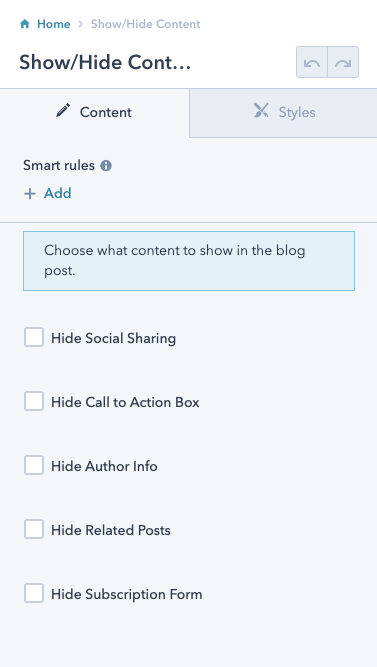
How to Use This Module
The Show/Hide Content module gives you complete control over which elements appear on your blog posts in the Bussin theme. Unlike standard drag-and-drop modules that add visible content to your pages, this module works behind the scenes to customize the layout and functionality of your blog post template.
To access this module, navigate to any blog post in your HubSpot page editor and click the Contents tab in the left sidebar. You’ll find the Show/Hide Content module listed among your available built-in modules. Once selected, the module’s options panel will appear on the right side of your screen.
When to use this module: This is particularly useful when you want to create different experiences for different types of blog content. For example, you might want to hide social sharing buttons on internal company announcements while keeping them visible on customer-facing articles. Similarly, you could disable the global subscription form on posts that already include topic-specific CTAs.
The module’s settings apply only to the specific blog post you’re editing, giving you post-by-post granular control. This is especially valuable for restaurants and local businesses using the Bussin theme, as you can tailor each post’s functionality to match its purpose—whether it’s a menu announcement, event promotion, or community story.
Pro tip: Consider creating a content strategy document that outlines which elements to show or hide for different post categories. This ensures consistency across your blog while maximizing engagement for each content type. Remember that changes made through this module won’t affect your blog listing page or other templates—only the individual blog post experience.