
Form Section
A full-width form section with a background color.
View a live demo of this section.
Modules
Usage Guide
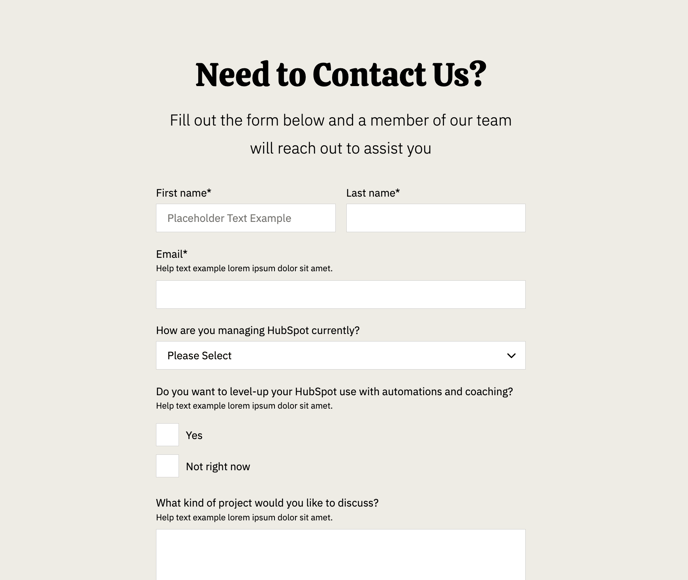
The Form Section provides a clean, full-width layout specifically designed to capture leads and customer inquiries on your restaurant or local business website. This section works particularly well on contact pages, reservation request pages, or as a standalone lead capture area on your homepage.
When you add this section to any page through the HubSpot page editor, you’ll get a pre-styled container with background color options that maintain the vibrant, energetic aesthetic of the Bussin theme. The full-width design ensures your forms command attention without competing with other page elements.
Best practices for implementation:
- Use this section on dedicated landing pages where form conversion is the primary goal
- Place it strategically on your contact page below your restaurant’s location and hours information
- Consider adding it to service pages where customers might want to request quotes or bookings
The included Theme Form module integrates seamlessly with HubSpot’s native form functionality, meaning you can connect it directly to your CRM and set up automated follow-up sequences. You can customize the background color through the theme settings to match seasonal promotions or brand campaigns.
Since this is a full-width section, it creates a natural break in your page content and draws the eye downward. This makes it particularly effective when placed after compelling copy about your restaurant’s specialties or business services. The background color helps separate the form from surrounding content while maintaining the playful design language that makes Bussin perfect for hospitality and local businesses.
For optimal mobile experience, the section automatically adjusts to smaller screens while preserving the visual impact that drives conversions.