
Locations
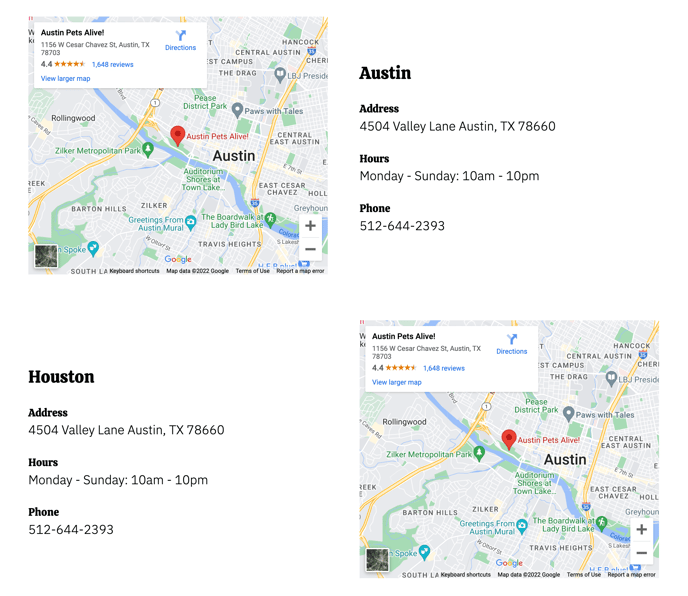
Two locations with a map on one side and contact info on the other.
View a live demo of this section.
Modules
- Contact Info x 2
Usage Guide
This Locations section is specifically designed for restaurants and local businesses that operate from multiple physical locations. The side-by-side layout creates an intuitive user experience by pairing essential contact details with visual map references, making it easy for customers to find and visit your establishments.
When you add this section through the HubSpot page editor’s drag-and-drop interface, you’ll immediately have space for two distinct locations. Each location utilizes the Contact Info module, which you can customize through the theme’s module settings to display your business name, address, phone number, hours of operation, and other relevant details. The integrated map functionality helps visitors visualize exactly where each location sits in relation to their current position.
Best practices for this section:
Use clear, descriptive location names in your Contact Info modules (like “Downtown Location” or “Westside Branch”) rather than just addresses. This helps visitors quickly distinguish between your different sites.
Consider this section for your main service pages, location-specific landing pages, or a dedicated “Find Us” page. The Bussin theme’s vibrant design elements work particularly well when you include high-quality photos of each location’s storefront or interior within the contact modules.
When to choose this over alternatives: Select the Locations section when you need to showcase exactly two locations with equal prominence. If you have just one location, use a single Contact Info module instead. For three or more locations, consider repeating this section or exploring the theme’s other layout options that can accommodate additional entries without overwhelming the page design.
The responsive layout ensures both locations display clearly on mobile devices, maintaining the visual hierarchy that makes location information scannable.