
Testimonial Slider
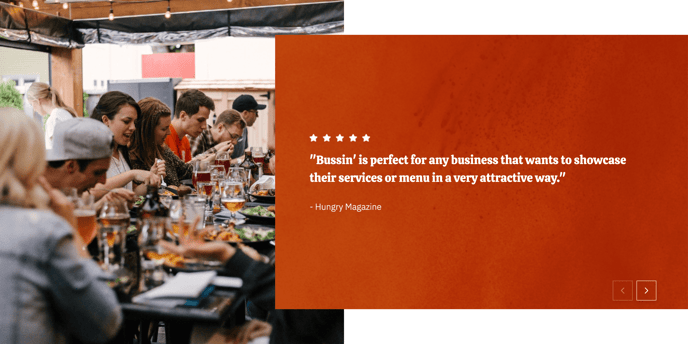
Full-width testimonial slider with a large left-side image and boxed-in content.
View a live demo of this section.
Modules
Usage Guide
The Testimonial Slider section is designed to showcase customer reviews and feedback with maximum visual impact on your restaurant or local business website. This section features a distinctive asymmetrical layout where a large hero image dominates the left side while customer testimonials are contained within an elegant boxed content area on the right.
You can add this section to any page using HubSpot’s drag-and-drop page editor by selecting it from your available sections. The full-width design makes it particularly effective on homepage layouts, dedicated testimonials pages, or as a trust-building element above your contact forms and booking sections.
When configuring the testimonial content through the page editor, focus on selecting testimonials that highlight specific menu items, dining experiences, or service qualities that align with your business goals. The large left-side image should complement your testimonials—consider using photos of happy customers, your restaurant’s atmosphere, or signature dishes that the testimonials reference.
The boxed content design helps testimonials stand out against busy background images, ensuring readability across all devices. This makes the section ideal when you want to feature longer, more detailed customer reviews rather than short quote snippets.
Best practices for this section:
- Use high-resolution images (at least 1200px wide) for the background to maintain visual quality across desktop and mobile
- Limit testimonials to 2-4 sentences for optimal readability within the boxed layout
- Position this section strategically after product showcases or before contact forms to build trust at crucial conversion points
- Ensure your testimonial images and content maintain consistent branding with your theme’s color scheme through the theme settings panel