
Comparison Table
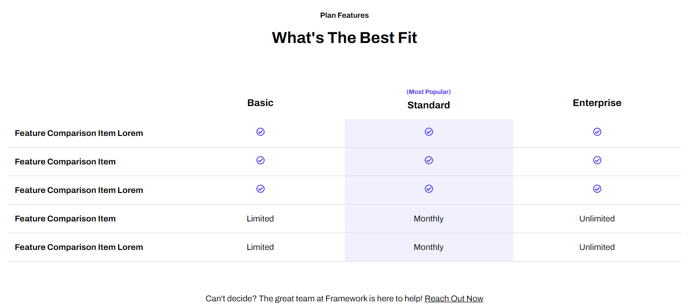
A table to compare features of different products or product levels.
View a live demo of this module.
Content
- Include a header/footer
- Choose to include text, custom icon, or FontAwesome icon each featured item column
- Add an eyebrow to heading columns to call out a column
Styles
- Set to Dark Mode
- Change header/footer alignment
- Change icon height
- Change background colors and text colors of the header row and even/odd columns
- Edit the border style
How to Use This Module
The Comparison Table module is designed specifically for SaaS and technology companies that need to showcase product tiers, feature differences, or competitive advantages on their HubSpot CMS pages. You can drag and drop this module onto any page template in your HubSpot page editor, making it perfect for pricing pages, product feature pages, or dedicated comparison landing pages.
When building your comparison table, start by determining how many products or tiers you want to compare—the module flexibly accommodates multiple columns while maintaining responsive design across devices. The eyebrow text feature above column headers is particularly effective for highlighting your recommended plan or most popular option, helping guide visitors toward your preferred conversion path.
Content Strategy Tips: Use concise, benefit-focused language in your feature rows rather than technical jargon. The custom icon options work well for check marks, X marks, or tier-specific graphics that reinforce your brand identity. Consider using FontAwesome icons for universally recognized symbols like checkmarks or stars.
Design Best Practices: The Dark Mode toggle integrates seamlessly with your site’s overall theme settings, ensuring brand consistency across all Framework theme pages. When customizing colors, maintain sufficient contrast ratios for accessibility compliance. The alternating row colors help users scan horizontally across feature comparisons more easily.
This module performs exceptionally well on pricing pages, where you can clearly differentiate between Basic, Pro, and Enterprise offerings. It’s also valuable on product comparison pages where you’re positioning your solution against competitors, or on feature overview pages where different service levels need clear visual distinction.