
Hero - eBook [+ only]
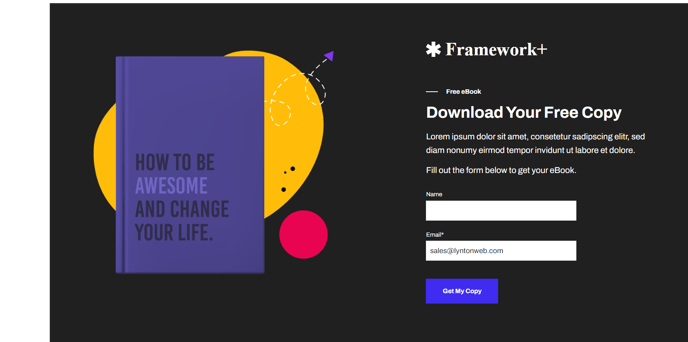
Two column hero with options to add logo, text, and a form on one side and an image on the other side.
Note: This module is only available in Framework+, a paid version of Framework. Note: Set this module’s section’s Content Alignment to Full Width.
View a live demo of this module.
Content
- Add image to one side; add logo, text, call to action, and form to other side
- Change vertical alignment of content (top, middle, bottom)
- Change placement of content on desktop (image to left, image to right) on mobile (image above text, image below text)
Styles
- Change desktop and mobile background (can be color, gradient, or image)
- Change padding
- Add animation to image
- On form set dark mode, include heading, and include box in styling
- Change label and button position of form
- Change form button color
- Set Dark Mode and and change text alignment of text
- Change list styling
About This Module
The Hero - eBook module is specifically designed for content marketers and SaaS companies looking to promote downloadable resources like eBooks, whitepapers, case studies, and guides. This conversion-focused module combines compelling visuals with lead capture functionality, making it ideal for landing pages, resource library pages, and campaign-specific promotional pages within your HubSpot CMS site.
When you drag this module into the HubSpot page editor, you’ll get a balanced two-column layout that maximizes conversion potential. The image side showcases your eBook cover or related visual, while the content side houses your value proposition, company logo for credibility, and an integrated HubSpot form for lead capture. This eliminates the need to create separate modules for each component.
Best practices for implementation: Place this module at the top of dedicated landing pages to immediately communicate your offer’s value. The built-in form integration connects directly to your HubSpot CRM, automatically capturing leads and triggering any workflows you’ve configured. For optimal mobile experience, test both image placement options (above or below text) to see which performs better with your specific content and audience.
The module works particularly well on thank you pages when promoting related resources, and on pillar pages where you want to capture emails from visitors consuming your content. Since Framework+ includes multiple hero variations, consider A/B testing this eBook-focused hero against other hero modules to optimize conversion rates for different types of offers and audience segments.