
Pricing Boxes
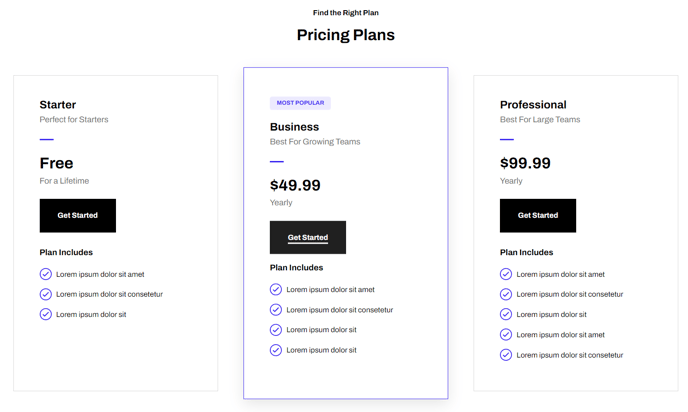
Informational boxes for product pricing.
View a live demo of this module.
Content
- Include a heading
- Change how many boxes to show per row
- Set a box as featured to call it out from the rest
Styles
- Set Dark Mode
- Change text alignment
- Set the module to overlap a section above or below it (only visible if module’s section and the section it’s overlapping have differing backgrounds)
- Edit background, border, and box-shadow of pricing boxes
- Edit border and featured heading of featured boxes
About This Module
The Pricing Boxes module is designed specifically for SaaS and technology companies that need to display their product pricing tiers in a clear, conversion-focused format. This module works exceptionally well on dedicated pricing pages, product landing pages, and even homepage sections where you want to highlight your pricing structure.
When adding this module to your pages through HubSpot’s drag-and-drop page editor, you’ll find it integrates seamlessly with the Framework theme’s clean aesthetic. The module automatically adapts to your theme’s color scheme and typography settings, ensuring consistency across your entire website.
Best practices for implementation: Use the featured box option to highlight your most popular or recommended pricing tier - this visual emphasis can significantly improve conversion rates. The module’s responsive design ensures your pricing tables look professional on all devices, with boxes automatically stacking on mobile screens for optimal readability.
For optimal page performance, consider placing this module within a section that has sufficient padding above and below. The overlap feature works particularly well when you want to create visual depth - try overlapping onto a colored or gradient background section to make your pricing stand out.
Content strategy tip: When populating your pricing boxes, keep descriptions concise and focus on key differentiators between tiers. The Framework theme’s typography hierarchy will naturally guide visitors’ eyes to the most important information. You can easily A/B test different pricing presentations by duplicating pages and adjusting the module’s styling options, such as text alignment and dark mode settings, to see what resonates best with your audience.