
Team Listing
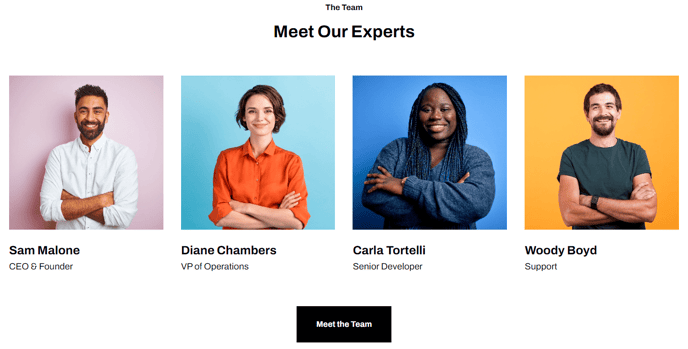
List out team members with their name, title, social links, and profile image.
View a live demo of this module.
Content
- Choose how many members to show per row
- Include a heading and call to action button
- Include image, name, title, and socials
Styles
- Set Dark Mode
- Set module to overlap a section above or below it (is only visible if section module is in and the section it’s overlapping have differing backgrounds)
- Choose aspect ratio of image
- Change text alignment
- Fully customize icons (color, hover, enclose, etc.)
Usage Guide
The Team Listing module is designed to showcase your company’s personnel in a professional, grid-based layout that builds trust and credibility with visitors. This module works particularly well on About pages, leadership pages, and department-specific landing pages where you want to put a human face on your organization.
When adding this module through the HubSpot page editor’s drag-and-drop interface, you’ll find it most effective when placed in full-width sections to accommodate multiple team members per row. The Framework theme’s responsive design ensures your team grid adapts seamlessly across devices, automatically adjusting the number of members displayed per row based on screen size.
Content Strategy Tips: Start by uploading consistent, high-quality headshots to your HubSpot File Manager before configuring the module. Square or rectangular aspect ratios work best for maintaining visual consistency across your team grid. When entering social links, prioritize professional networks like LinkedIn over personal social media to maintain your site’s business focus.
The module’s dark mode setting integrates with Framework’s overall theme styling, making it perfect for alternating section backgrounds or creating visual contrast on your pages. Use the overlap feature strategically when placing the module adjacent to hero sections or call-to-action areas to create dynamic, layered page designs.
For optimal performance, limit each Team Listing module to 12-16 members maximum. If you have a larger team, consider creating separate modules for different departments or using multiple Team Listing modules with descriptive headings like “Leadership Team” or “Sales Department” to maintain page load speeds and user experience.