
Testimonials Static
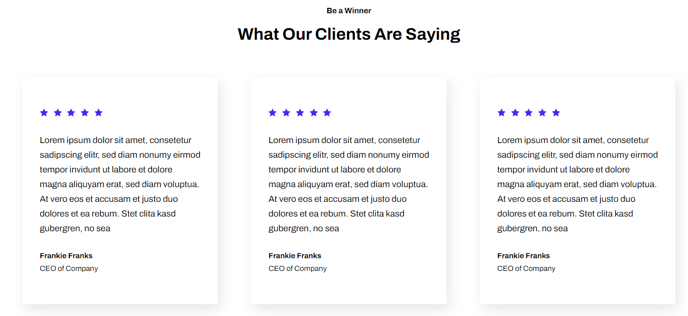
Simple testimonials in columns.
View a live demo of this module.
Content
- Include a heading
- Include review score, quote, image, name, and title
- Choose how many testimonials to show per row
Styles
- Set Dark Mode
- Change heading and text alignment
- Change review stars color
- Edit background, padding, border, and box-shadow of testimonials
Usage Guide
The Testimonials Static module is designed to showcase customer feedback in a clean, structured layout that builds credibility for your SaaS or technology company. Unlike dynamic testimonials that rotate or change automatically, this static module displays multiple testimonials simultaneously in a column-based grid, allowing visitors to scan and read all testimonials at once.
This module works particularly well on landing pages, product pages, and your about page where you want to establish trust and social proof. Content editors can easily add this module through HubSpot’s drag-and-drop page editor by searching for “Testimonials Static” in the module library and dragging it onto any page section.
When configuring your testimonials, include specific details like company names, job titles, and headshots to maximize authenticity. The review score feature supports both numerical ratings and star displays, giving you flexibility in how you present customer satisfaction data. For optimal visual impact, aim for testimonials of similar length to maintain consistent card heights across your grid.
The Framework theme’s responsive design ensures your testimonials display properly across all devices. On desktop, you might show three testimonials per row, while mobile automatically stacks them vertically for easy reading.
Pro tip: Use the dark mode toggle when placing testimonials on pages with varied background colors or when you want to create visual contrast with surrounding content sections. The background styling options let you add subtle shadows or borders that help testimonials stand out without overwhelming your page design.
Consider grouping testimonials by customer type or use case when you have multiple testimonials, as this helps visitors find relevant social proof that resonates with their specific situation.