
FAQ With Left Header
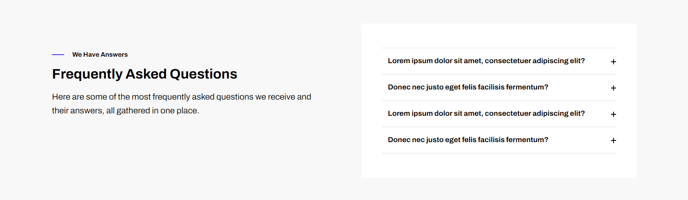
A set of boxed-in FAQ items with a left side header and medium light background.
View a live demo of this section.
Modules:
Usage Guide
The FAQ with Left Header section provides an elegant solution for displaying frequently asked questions on your SaaS or technology company website. This section features a distinctive left-aligned header area that creates visual separation between your section title and the actual FAQ content, making it ideal for support pages, product documentation, or service explanation pages.
When adding this section through the HubSpot page editor’s drag-and-drop interface, you’ll notice the layout automatically organizes into two distinct zones. The left header area utilizes the Theme Rich Text module, allowing you to add formatted headings, introductory text, or even call-to-action buttons alongside your FAQ title. This flexibility makes the section particularly effective for pages where you want to provide context or direct users to additional resources.
The right side houses your actual questions and answers using the Collapsible Text module. Each FAQ item appears in a clean, boxed design that expands when clicked, keeping your page organized and scannable. The medium light background ensures sufficient contrast while maintaining the Framework theme’s minimal aesthetic.
Best practices for this section:
- Use the left header space for brief introductory text explaining what users will find in the FAQ
- Organize your questions from most common to least common for better user experience
- Keep question titles concise and descriptive to improve both usability and SEO
- Consider adding contact information or links to additional support resources in the left header area
This section works particularly well on dedicated FAQ pages, product support pages, or as a secondary section on service landing pages where you need to address common customer concerns while maintaining visual hierarchy.