
Recent Posts
A set of three most recent blog posts.
View a live demo of this section.
Modules:
Usage Guide
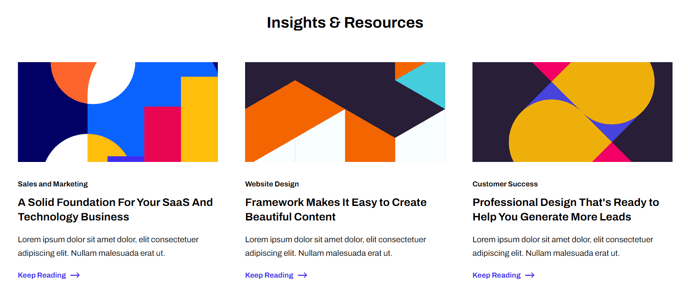
The Recent Posts section automatically pulls your three most recent blog posts and displays them in a clean, card-based layout that’s perfect for keeping visitors engaged with your latest content. This section works particularly well on your homepage, service pages, or any landing page where you want to showcase thought leadership and drive traffic to your blog.
When you add this section to any page through HubSpot’s drag-and-drop page editor, it will dynamically update whenever you publish new blog content—no manual updates required. The section displays each post with its featured image, title, excerpt, and publication date in an organized three-column grid that adapts seamlessly to mobile devices.
Best placement strategies include positioning this section near the bottom of your homepage to encourage deeper site exploration, or incorporating it into resource pages where prospects are already consuming educational content. For SaaS and technology companies, this section helps establish credibility by highlighting your team’s expertise and industry insights.
The Related Resources module within this section can be customized through the theme settings to control aspects like excerpt length, image sizing, and call-to-action styling. You can also modify the section heading and subheading text directly in the page editor to match your brand voice—consider titles like “Latest Insights,” “From Our Blog,” or “Industry Updates.”
Pro tip: If you don’t have three published blog posts yet, the section will gracefully display only the available posts without breaking the layout. However, for optimal visual impact, ensure you have at least three posts with compelling featured images before adding this section to high-traffic pages.