
Blog Listing
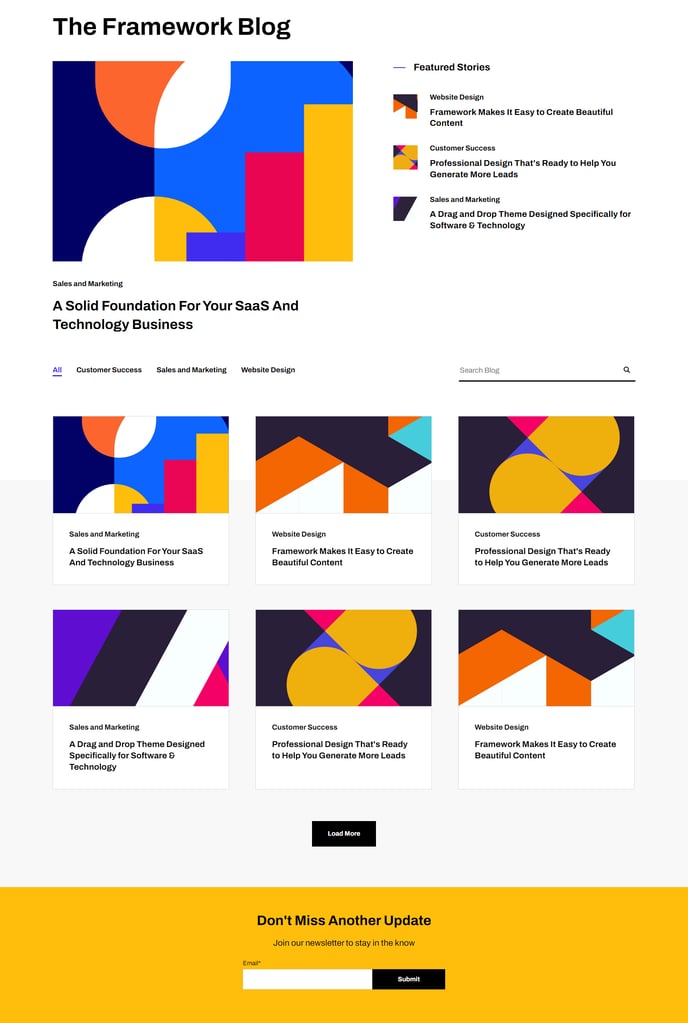
A filterable, searchable, and infinite load blog listing topped by a set of featured posts.
Note: Read this HubSpot knowledge base article for a guide on applying a template to your blog listing and editing the listing page.
Default Modules:
- Indexing and Social SEO [+ only]
- Schema [+ only]
- Back to Top
- Theme Rich Text
- Blog Featured Posts
- Blog Listing
- Theme Form
How to Use This Template
The Blog Listing template is specifically designed to create an engaging hub for your content that goes beyond HubSpot’s default blog listing functionality. When you apply this template to your blog listing page through the page editor, you’ll get a sophisticated two-tier content display that showcases your most important posts while maintaining easy access to your entire blog archive.
The template’s standout feature is the Blog Featured Posts module at the top, which allows you to manually curate which articles get premium visibility. You can select specific posts to highlight based on performance, strategic importance, or seasonal relevance through the module settings in the page editor. This featured section acts as your content showcase, perfect for driving engagement with high-value pieces that support your SaaS or technology company’s thought leadership goals.
Below the featured posts, the main Blog Listing module provides your visitors with powerful filtering and search capabilities. Your content editors can configure topic-based filters through your blog settings, making it easy for visitors to find relevant content. The infinite scroll functionality keeps users engaged by seamlessly loading additional posts without page refreshes.
Setup tip: Use the Theme Rich Text module to add contextual copy above your featured posts, such as “Latest insights from our team” or “Trending topics in [your industry].” This helps visitors understand your content strategy and improves the page’s SEO value.
The template works particularly well for technology companies that publish regular thought leadership content, product updates, and industry insights. The clean, minimal design ensures fast loading times while the structured layout helps search engines understand your content hierarchy, supporting your overall content marketing strategy.