
Flex
Compilation of several modules for use on inner content pages.
Default Modules:
- Indexing and Social SEO [+ only]
- Schema [+ only]
- Back to Top
- Theme Rich Text
- Page Navigation
- Tabbed Content
- Text and Image Columns
- Feature Items
- Case Study Slider
- Testimonials Static
- Pricing Boxes
- Testimonials Slider
- Theme Form
- Related Resources
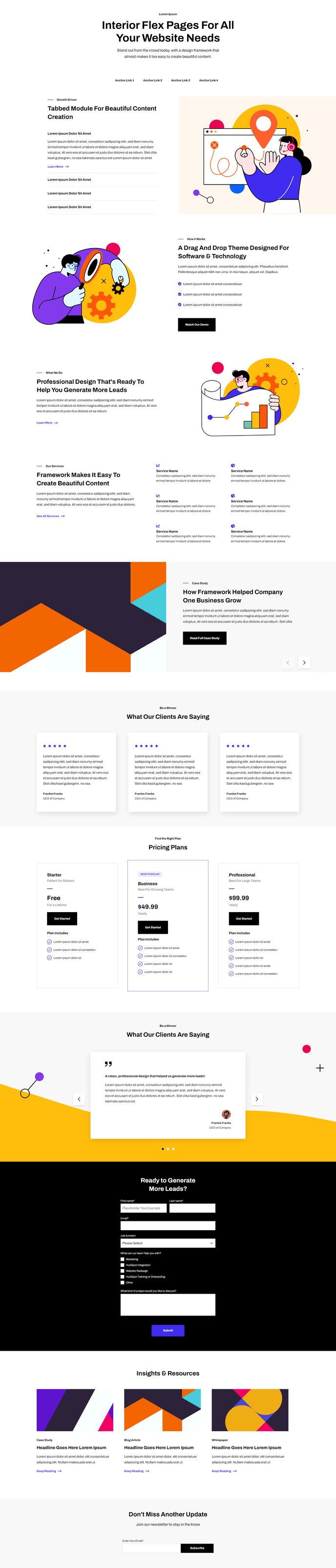
How to Use the Flex Template
The Flex template serves as Framework’s most versatile page template, designed specifically for creating custom inner content pages that need maximum flexibility. Unlike the more structured homepage or landing page templates, Flex gives you complete creative control through its comprehensive module collection, making it ideal for service pages, about pages, resource hubs, and any content page that requires multiple content types.
When you create a new page using the Flex template in your HubSpot page editor, you’ll immediately have access to all 14 default modules through the drag-and-drop interface. This eliminates the need to manually add modules one by one, significantly speeding up your page creation process. The template automatically includes essential backend modules like Schema markup and SEO indexing (in Framework+), ensuring your pages are search-engine optimized from the start.
The real power of Flex lies in its modular approach. You can mix and match modules to create unique page layouts – combine Feature Items with Pricing Boxes for service pages, use Tabbed Content alongside Case Study Sliders for portfolio sections, or build comprehensive resource pages using Theme Rich Text, Related Resources, and Page Navigation modules together.
Content editors will appreciate the pre-configured module settings that maintain visual consistency while allowing customization through HubSpot’s content editor. Each module inherits Framework’s clean design system, so you can focus on content rather than styling. The template works particularly well for SaaS companies that need to create detailed product pages, feature comparisons, or customer success stories that require multiple content formats on a single page.
For best results, plan your content hierarchy before building – use the Page Navigation module to create in-page anchors for longer content sections.