
Pricing
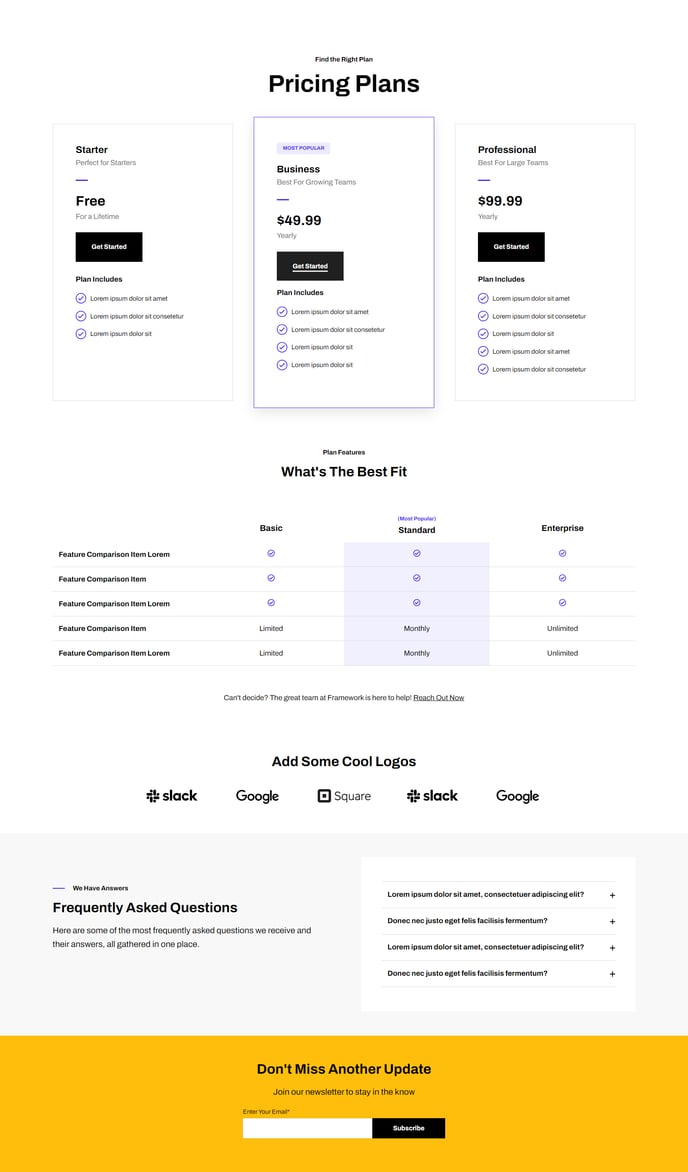
Show pricing tiers and service comparisons.
Default Modules:
- Indexing and Social SEO [+ only]
- Schema [+ only]
- Back to Top
- Pricing Boxes
- Comparison Table
- Logos
- Theme Rich Text
- Collapsible Text
- Theme Form
How to Use This Template
The Framework Pricing template is specifically designed for SaaS and technology companies that need to present multiple service tiers with clear feature comparisons. This template excels at converting visitors by organizing complex pricing information into digestible sections that guide prospects toward making a purchase decision.
When you create a new page using this template, you’ll immediately have access to Pricing Boxes and Comparison Table modules pre-configured in the page editor. The Pricing Boxes module works perfectly for displaying your core subscription tiers with prominent call-to-action buttons, while the Comparison Table module handles detailed feature breakdowns that help visitors understand exactly what they’re getting at each price point.
Content Strategy Tips: Position your most popular or recommended pricing tier in the center box to draw attention, and use the Collapsible Text module to address common pricing objections or frequently asked questions without cluttering your main pricing display. The Logos module works particularly well on pricing pages to showcase customer testimonials or security certifications that build trust during the decision-making process.
In the HubSpot page editor, you can easily drag and drop additional modules between the default pricing sections. Consider adding the Theme Form module below your pricing tiers to capture leads from visitors who aren’t ready to purchase immediately. The clean markup ensures your pricing page loads quickly and displays consistently across all devices, which is crucial for maintaining conversion rates on mobile traffic.
The template’s minimal design keeps focus on your pricing content rather than competing visual elements, making it ideal for B2B software companies where clear communication trumps flashy design.