
Blog Post Author
Display author information for a blog post.
Note: This module is only able to be used on Blog Post and Blog Listing templates.
Styles
- Edit padding
- Change text alignment
- Set Dark Mode
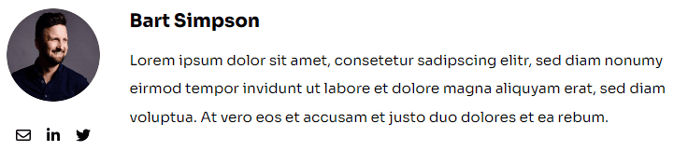
How to Use This Module
The Blog Post Author module is specifically designed to showcase author credentials and build trust with your nonprofit or educational audience. When visitors read your blog posts, this module automatically pulls author information from HubSpot’s user database and displays it in a clean, professional format that matches the Impact theme’s bold visual style.
You’ll find this module most effective when placed at the beginning or end of your blog post content. Many Impact theme users position it directly after the blog post title to immediately establish credibility, while others prefer placing it at the bottom to encourage readers to learn more about the author after consuming the content.
Setting up the module is straightforward through HubSpot’s drag-and-drop page editor. Simply navigate to your Blog Post template in Design Manager, locate the Blog Post Author module in the module library, and drag it into your desired content area. The module will automatically detect and display information for whoever authored each individual blog post.
The Dark Mode option is particularly valuable for Impact theme users who want to create visual contrast on their pages. This works especially well when your blog post content sits on light backgrounds but you want the author section to stand out with Impact’s signature bold styling.
Text alignment settings give you flexibility to match your organization’s branding preferences. Center alignment works well for formal academic content, while left alignment feels more conversational for nonprofit storytelling.
Remember that author information pulls from each HubSpot user’s profile settings, so encourage your team members to complete their bio, profile photo, and social media links in their user accounts for the most professional presentation.