
Featured Items - Boxed In, Overlap
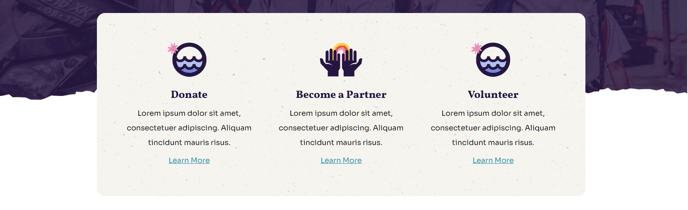
A boxed-in set of three featured items that will overlap the section above it.
Note: This section and the section above must have different backgrounds for the overlap to be visible.
View a live demo of this section.
Modules
How to Use This Section
This Featured Items section creates a distinctive visual effect by positioning three boxed content items so they overlap the section directly above it on your page. The overlap design helps break up traditional page layouts and draws visitor attention to your most important content, making it particularly effective for highlighting key programs, services, or achievements on nonprofit and education websites.
When to Choose This Section
Select this section when you want to showcase three primary offerings or initiatives with more visual impact than standard grid layouts. The overlapping design works especially well after hero sections, large images, or video backgrounds where the contrast between sections creates a striking visual break.
Setup Requirements
To achieve the intended overlap effect, you must ensure the section positioned above this one has a different background color or image. Without this contrast, the overlapping boxed items will blend into the background and lose their visual impact. You can adjust background settings in the page editor by selecting the section above and modifying its styling options.
Content Strategy Tips
Each of the three featured items should represent equal-priority content since they receive similar visual weight in the layout. This makes the section ideal for highlighting three main service areas, key statistics, or featured programs. Keep your headlines concise and use compelling images, as the boxed format provides limited space for lengthy descriptions.
Placement Considerations
This section works best in the upper portion of your pages where the overlap effect is immediately visible to visitors. Consider using it after your hero section on homepage layouts, or following header content on service or about pages to immediately showcase your organization’s core offerings.