
Hero - Program
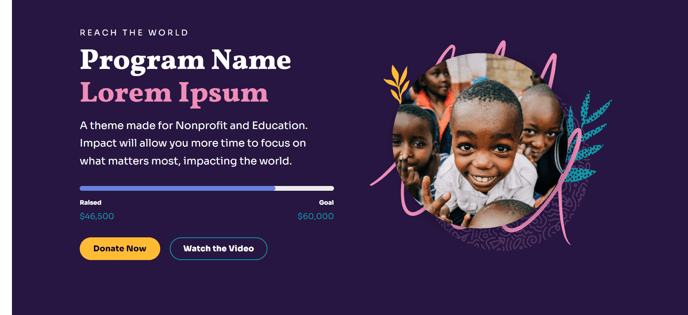
Full-width, two-column hero that includes a goal progress bar.
View a live demo of this section.
Modules
Usage Guide
The Hero - Program section is specifically designed for nonprofit and educational organizations that need to showcase program initiatives with clear progress tracking. This full-width hero creates an immediate visual impact on your landing pages while communicating program goals and current achievements to visitors.
You can add this section to any page in your HubSpot CMS by opening the page editor and selecting it from the pre-built sections library. The two-column layout automatically adapts to your content, with the left column typically featuring your program headline and description, while the right column displays visual elements that support your message.
The goal progress bar is the standout feature of this section, making it ideal for fundraising campaigns, educational program enrollment targets, or community initiative milestones. You can customize the progress percentage and styling through the section’s settings panel, ensuring it aligns with your current campaign metrics.
When setting up this section, consider using it on dedicated program pages, campaign landing pages, or your organization’s homepage to highlight priority initiatives. The bold typography characteristic of the Impact theme ensures your program messaging remains readable and compelling across all device sizes.
For optimal results, pair compelling program imagery with concise, action-oriented copy. The full-width design works particularly well when you want to create separation between different content areas on longer pages. You can easily duplicate this section and modify the content for multiple programs, maintaining visual consistency while highlighting different initiatives across your site.
Remember to update the progress bar regularly to keep donors and stakeholders engaged with real-time campaign progress.