
Team Listing - Filterable
A list of team members with a filter.
View a live demo of this section.
Modules
How to Use This Section
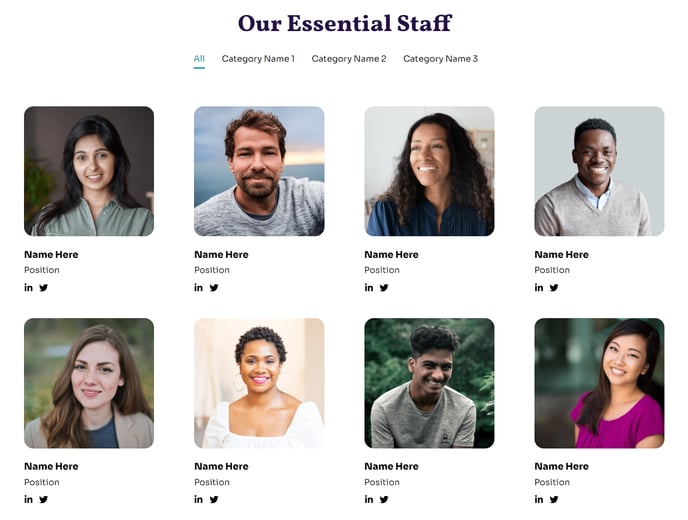
The Filterable Team Listing section is perfect for organizations with larger teams or multiple departments who need to help visitors find specific staff members quickly. Unlike the standard team listing, this section includes interactive filter buttons that allow users to sort team members by department, role, or custom categories you define.
When you drag this section into your page editor, you’ll get the powerful Team Listing module pre-configured with filtering functionality. This is particularly valuable for nonprofit organizations showcasing board members, staff, and volunteers, or educational institutions displaying faculty across different departments or academic disciplines.
Setting up your filters is straightforward through the team listing module settings. You can create custom categories like “Leadership,” “Program Staff,” or “Board Members” and assign each team member to one or more categories. The filter buttons automatically generate based on the categories you use, so there’s no additional configuration needed.
The section works exceptionally well on About Us pages, Staff Directory pages, or dedicated Team pages. For larger organizations, consider using this on your main team page while using the simpler team listing section for highlighting just key leadership elsewhere on your site.
Pro tip: When adding team member photos, use consistent image dimensions and lighting for the most professional appearance. The Impact theme’s full-width sections make team photos prominent, so high-quality headshots will significantly impact your site’s visual appeal.
The filtering functionality is mobile-responsive, ensuring visitors can easily browse your team on any device. This makes it an ideal choice when you expect users to frequently reference your team directory or when you want to highlight the depth of expertise within your organization.