
Blog Listing
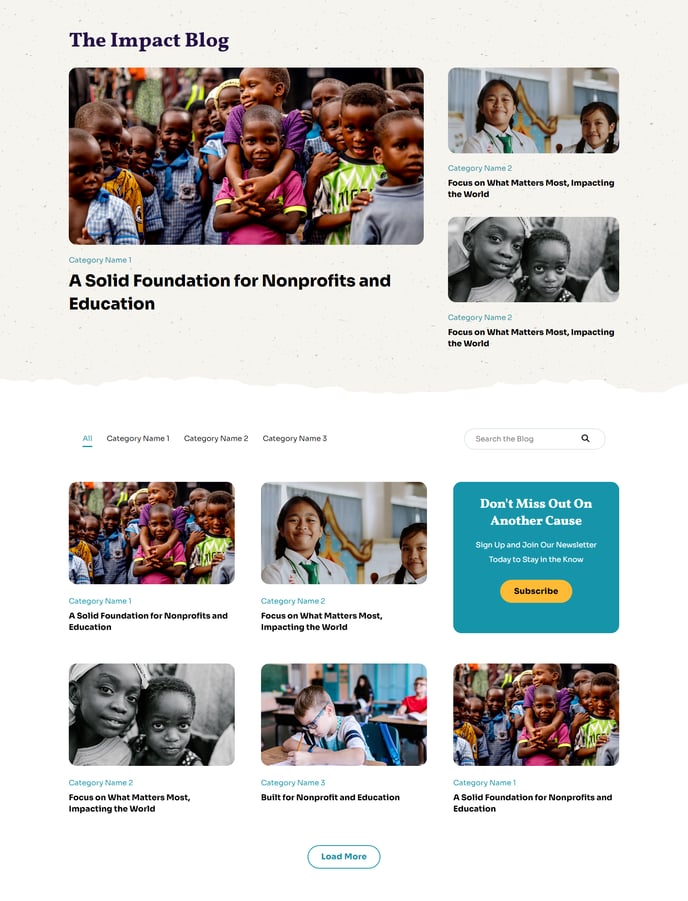
A filterable, searchable, infinite-load blog listing topped by a set of featured posts.
Note: Read this HubSpot knowledge base article for a guide on applying a template to your blog listing and editing the listing page.
Default Modules:
How to Use This Template
The Blog Listing template is designed to maximize engagement and discoverability for your nonprofit or education organization’s blog content. Unlike a basic blog layout, this template features a prominent featured posts section at the top that acts as a visual showcase for your most important announcements, campaigns, or educational content.
When you apply this template to your blog listing page through the HubSpot page editor, you’ll immediately benefit from the built-in filtering and search functionality that helps visitors find relevant content quickly. This is particularly valuable for organizations with diverse content covering multiple programs, initiatives, or educational topics.
The infinite-load feature eliminates pagination, creating a seamless browsing experience that encourages visitors to explore more of your content. You can customize which posts appear in the featured section by using HubSpot’s blog post settings – simply mark posts as “featured” in your blog dashboard, and they’ll automatically populate the top section.
Best practices for this template:
- Use the Theme Rich Text module at the top to add context about your blog’s purpose or current campaigns
- Rotate featured posts regularly to highlight seasonal content, urgent appeals, or key educational resources
- Configure your blog tags thoughtfully, as the filtering system relies on these to help visitors navigate your content
- Consider your posting frequency – the infinite-load design works best with a steady stream of content
The template’s full-width design philosophy aligns with Impact’s bold visual approach, ensuring your blog posts get maximum visual impact while maintaining readability across all devices.