
Landing
Provide specific information or feature content to download.
Default Modules:
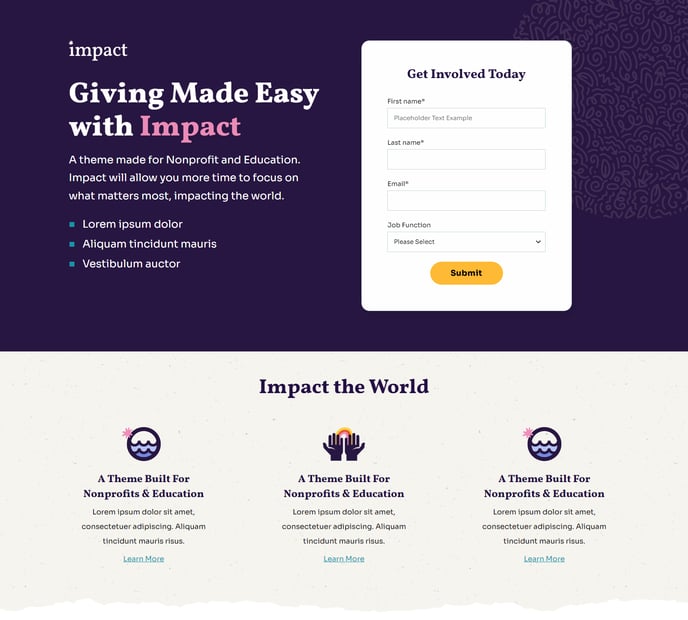
How to Use This Template
The Landing template is specifically designed to convert visitors into leads through focused, distraction-free layouts. Unlike the Impact theme’s other page templates, Landing removes navigation complexity and concentrates on a single conversion goal, making it ideal for marketing campaigns, gated content downloads, and educational resource promotion.
When you create a new page using this template in HubSpot’s page editor, you’ll start with a streamlined two-module foundation. The Hero - Two Column module immediately establishes your value proposition with compelling headlines and form placement, while the Feature Items module highlights key benefits or features that support your conversion objective. This minimal structure prevents visitor overwhelm while maintaining the Impact theme’s signature bold typography and full-width visual impact.
To maximize effectiveness, customize the hero section’s headline and supporting copy to match your campaign messaging. Use the drag-and-drop editor to add additional modules like testimonials, FAQ sections, or media galleries if they support your conversion goal. However, avoid cluttering the page—landing pages perform best when focused on a single action.
The template’s full-width sections leverage Impact’s design strengths, ensuring your content maintains visual appeal across devices. In the theme settings, you can adjust color schemes and typography to align with your organization’s branding while preserving the template’s conversion-focused layout.
Consider using this template for webinar registrations, white paper downloads, course enrollment pages, or donation campaigns. The clean structure works particularly well for nonprofit and educational organizations that need to clearly communicate value while encouraging immediate action from their audience.