
System - 404 Error
Partial for use on System - 400 Error template.
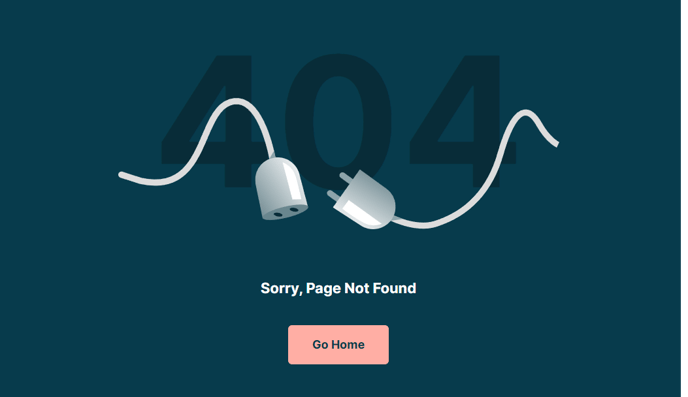
The following is a detailed listing of the styling edits made to the partial’s sections, the modules used in the sections, and field changes from the modules’ default state.
Section 1
Section Styles
Alignment and spacing > Padding
Top: theme.global.spacing.sections / 2
Background > Background color
theme.global.colors.backgrounds.medium_dark.color
Modules
Visible Elements
Heading
Semantic Heading Level
1
Style Heading Level
4
Styles > Dark Mode
true
Styles > Text Alignment
Desktop: Center
Styles > Heading > Font
Size: 278
Color: theme.global.colors.backgrounds.dark.color
Styles > Heading > Line Height
1
Styles > Heading > Mobile Font Size
175
Media Type
Image
Image
Src: 404-plug.svg
Styles > Module > Spacing > Desktop > Margin
Top: -175
Bottom: 75
Styles > Module > Spacing > Mobile > Margin
Top: -115
Styles > Text Alignment
Desktop: Center
Visible Elements
Heading
Style Heading Level
4
Styles > Dark Mode
true
Styles > Text Alignment
Desktop: Center
Utility Items
Utility Type: Button
Styles > Module > Alignment
Desktop: Center
Styles > Module > Spacing > Desktop > Margin
Top: 40
Usage Guide
When visitors encounter a broken link or mistyped URL on your HubSpot site, this 404 error partial ensures they receive a professional, on-brand experience rather than a generic browser error. The Rubric theme’s 404 partial is specifically designed to maintain visual consistency with your site while providing clear navigation options back to working content.
You can access this partial through the Page Editor when editing your System - 404 Error template in Settings > Website > Pages. The partial features a distinctive dark background that immediately signals an error state while maintaining the theme’s educational focus. The large “404” heading uses oversized typography (278px on desktop) to create visual impact without appearing harsh or intimidating.
Customization opportunities include replacing the default 404-plug.svg image with your institution’s mascot or a custom illustration that aligns with your brand personality. You can modify the explanatory text in the second Text Block module to include institution-specific messaging, such as directing students to your help desk or referencing common pages they might be seeking.
The Utility module at the bottom provides space for action buttons—consider adding links to your homepage, site search, or contact information. Since this is a global partial, any changes you make will automatically update across all 404 error instances on your site, ensuring consistent user experience.
Best practices for educational institutions include adding links to your academic calendar, student portal, or course catalog, as these are frequently accessed pages that users might misspell. The center-aligned layout works particularly well for the error context, creating a focused landing point that doesn’t overwhelm visitors who are already experiencing navigation difficulties.