
System - Membership Registration
Partial for use on System - Membership Registration template.
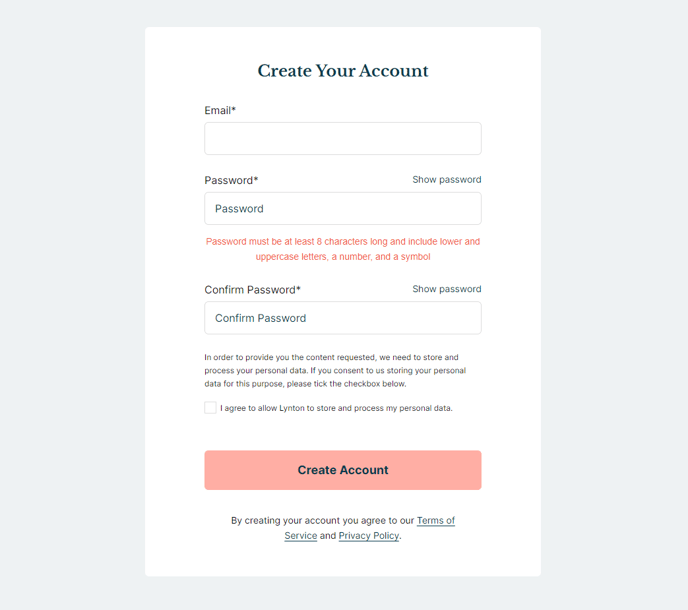
The following is a detailed listing of the styling edits made to the partial’s sections, the modules used in the sections, and field changes from the modules’ default state.
Section 1
Section Styles
Alignment and spacing > Content alignment
Full Width
Alignment and spacing > Padding > Default
Top: 50
Right: 90
Bottom: 50
Left: 90
Alignment and spacing > Padding > Mobile
Top: 50
Right: 50
Bottom: 50
Left: 50
Background > Background color
theme.global.colors.backgrounds.base.color
Modules
Styles > Max Width
600
Styles > Borders > Radius
theme.global.borders.radius
Visible Elements
Heading
Semantic Heading Level
1
Style Heading Level
3
Styles > Module > Spacing > Desktop > Margin
Bottom: 15
Styles > Text Alignment
Desktop: Center
Page Type
Membership Registration
Form Layout > Button Position
Full
Visible Elements
Body Text
Text Size
Small
Styles > Module > Max Width
350
Styles > Module > Alignment
Desktop: Center
Styles > Module > Spacing > Desktop > Margin
Top: 35
Styles > Text Alignment
Desktop: Center
Overview
The System - Membership Registration partial provides a clean, conversion-focused layout for HubSpot’s membership registration functionality within the Rubric theme. This partial is specifically designed to handle user registration forms for membership areas, making it essential for educational institutions and organizations that need to gate content behind member logins.
When you implement this partial on your membership registration template, it creates a centered, card-style layout that reduces visual distractions and keeps users focused on completing their registration. The 600-pixel max width container with rounded corners (using the theme’s global border radius) creates a professional, contained appearance that works well on both desktop and mobile devices.
The partial’s structure follows a logical flow: a prominent heading introduces the registration process, followed by the core HubSpot membership registration form, and concludes with helpful footer text. The System Page Content module is configured specifically for membership registration, with the button position set to “Full” to create a strong call-to-action that spans the entire form width.
Key advantages of this partial include responsive padding that adjusts from 90 pixels on desktop to 50 pixels on mobile, ensuring optimal spacing across all devices. The centered text alignment and smaller footer text (configured at 350-pixel max width) provide clear visual hierarchy without overwhelming new users.
You’ll typically use this partial when setting up protected content areas, course enrollment systems, or member-only resource libraries. Since it’s a global partial, any updates you make will automatically reflect across all pages where it’s implemented, making site-wide registration experience updates efficient and consistent.
The background color automatically inherits from your theme’s global color settings, ensuring brand consistency without manual color matching.