
System - Membership Reset Password
Partial for us on System - Membership Reset Password template.
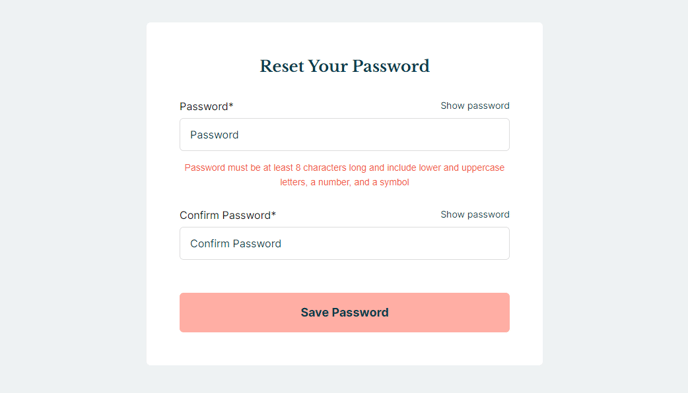
The following is a detailed listing of the styling edits made to the partial’s sections, the modules used in the sections, and field changes from the modules’ default state.
Section 1
Section Styles
Alignment and spacing > Content alignment
Full Width
Alignment and spacing > Padding > Default
Top: 50
Right: 50
Bottom: 50
Left: 50
Background > Background color
theme.global.colors.backgrounds.base.color
Modules
Styles > Max Width
600
Styles > Borders > Radius
theme.global.borders.radius
Visible Elements
Heading
Semantic Heading Level
1
Style Heading Level
3
Text Size
Medium
Styles > Module > Spacing > Desktop > Margin
Bottom: 15
Styles > Text Alignment
Desktop: Center
Page Type
Membership Reset Password
Form Layout > Button Position
Full
Usage Guide
This partial powers the membership reset password functionality in your Rubric theme, providing a clean and user-friendly interface for members who need to regain access to their accounts. The partial automatically appears on your site’s system-generated reset password page when HubSpot’s membership features are enabled.
When members click a password reset link from their email, they’ll land on a page using this partial. The centered layout with moderate padding creates a focused experience that reduces distractions during this critical user flow. The 600-pixel max width ensures the form remains readable on desktop devices while staying mobile-responsive.
You can customize the welcome message through the Text Block module’s heading field in the page editor. Consider updating this text to match your organization’s tone—educational institutions might use “Reset Your Student Portal Password” while event organizers could say “Regain Access to Your Event Dashboard.”
The System Page Content module handles all the technical functionality, including form validation and HubSpot’s security protocols. The full-width button positioning ensures the submit action is prominent and accessible across devices. You cannot modify the actual form fields since HubSpot manages these for security compliance, but you can adjust the visual styling through the theme settings.
Integration with your membership system happens automatically once you’ve configured HubSpot’s membership tools in your account settings. The background color pulls from your theme’s global color palette, ensuring brand consistency across your member experience. If you need to modify the overall spacing or background treatment, edit the section styles rather than individual modules to maintain the unified appearance.
This partial works exclusively with HubSpot’s membership system and cannot be repurposed for other password reset functionality outside of the membership context.