
System - Membership Reset Password Request
Partial for use on System - Membership Reset Password Request template.
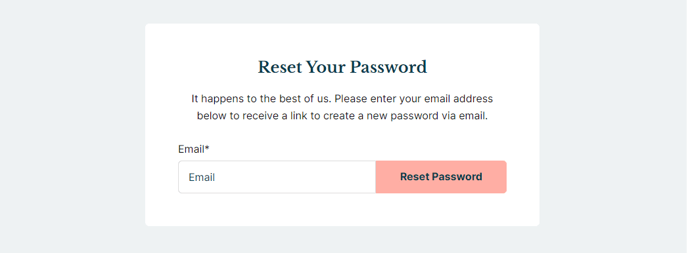
The following is a detailed listing of the styling edits made to the partial’s sections, the modules used in the sections, and field changes from the modules’ default state.
Section 1
Section Styles
Alignment and spacing > Content alignment
Full Width
Alignment and spacing > Padding > Default
Top: 50
Right: 50
Bottom: 50
Left: 50
Alignment and spacing > Padding > Mobile
Top: 50
Right: 25
Bottom: 50
Left: 25
Background > Background color
theme.global.colors.backgrounds.base.color
Modules
Styles > Max Width
600
Styles > Borders > Radius
theme.global.borders.radius
Visible Elements
Heading, Body Text
Semantic Heading Level
1
Style Heading Level
3
Text Size
Miedum
Styles > Module > Spacing > Desktop > Margin
Bottom: 15
Styles > Text Alignment
Desktop: Center
Page Type
Membership Reset Password Request
Form Layout > Button Position
Full
About This Feature
The System - Membership Reset Password Request partial is a specialized HubSpot component designed specifically for membership sites using the Rubric theme. This partial handles the critical user experience of password recovery, providing a clean, form-focused interface that maintains your site’s professional appearance while users reset their credentials.
When to Use This Partial
This partial automatically activates when you enable membership functionality in your HubSpot CMS hub. It’s specifically designed for the password reset workflow, appearing when members click “Forgot Password” links from your login pages. The partial integrates seamlessly with HubSpot’s built-in membership system, requiring no additional configuration for basic functionality.
Design and User Experience
The partial features a centered, card-style layout with rounded corners that aligns with Rubric’s modern aesthetic. The 600px maximum width ensures optimal readability across devices, while the responsive padding adjustments maintain proper spacing on mobile screens. The background color automatically inherits from your theme’s global color settings, ensuring brand consistency without manual updates.
Customization Tips
You can modify the heading and body text in the Text Block module to match your institution’s tone—particularly useful for educational organizations that may want more formal or branded messaging. The System Page Content module’s full-width button layout maximizes user interaction, but you can adjust this in the page editor if your design requires different button positioning.
Template Integration
This partial works exclusively with HubSpot’s system membership templates and cannot be used on standard website pages. When editing your membership reset password template in the page editor, this partial ensures consistent styling with your main site while providing the specialized functionality required for secure password recovery workflows.