
System - Search Results
Partial for use on System - Search Results template.
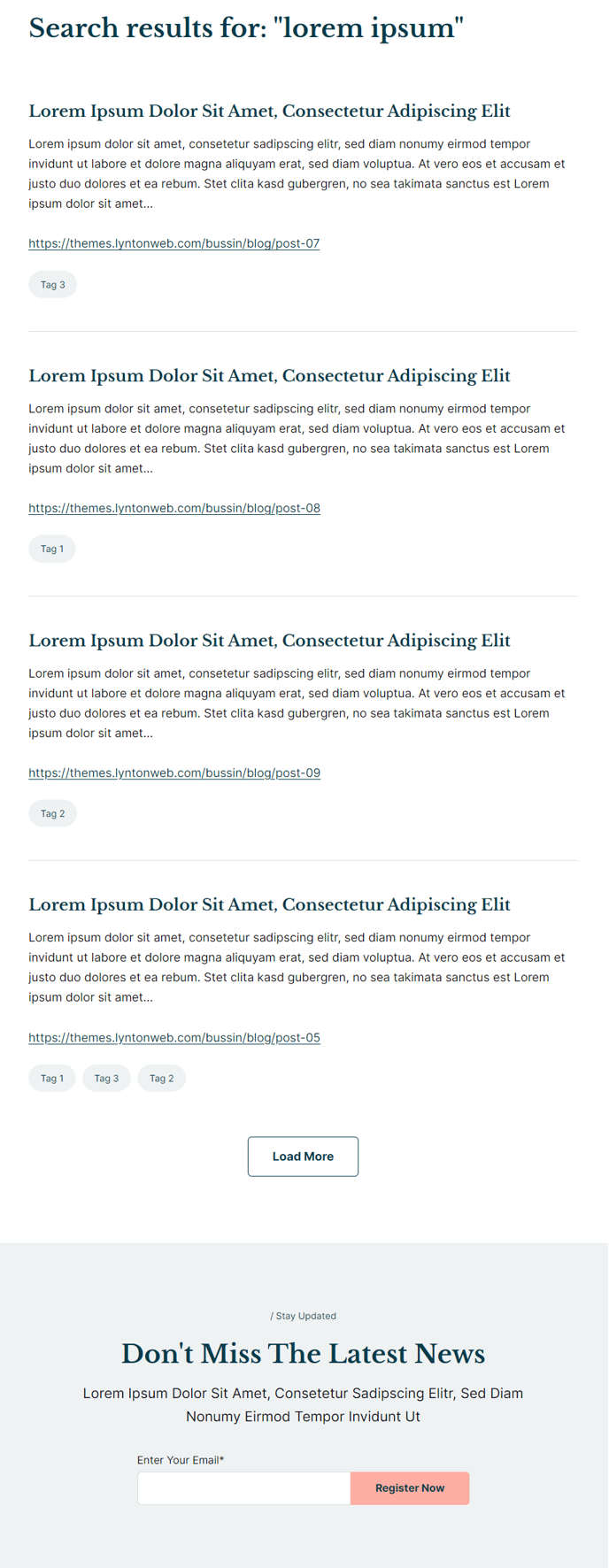
The following is a detailed listing of the styling edits made to the partial’s sections, the modules used in the sections, and field changes from the modules’ default state.
Section 1
Section Styles
Alignment and spacing > Padding > Default
Top: theme.global.spacing.sections / 1.5
Modules
Visible Elements
Heading
Semantic Heading Level
1
Style Heading Level
2
Styles > Module > Spacing > Desktop > Margin
Bottom: theme.global.spacing.sections / 1.5
Styles > Text > Margin > Top
0
Page Type
Site Search Results
Search Results > Strings > No Results Message
There are no results matching your query.
Section 2
How to Use This Feature
The System - Search Results partial provides a complete search experience for your HubSpot site visitors when they use the built-in site search functionality. This partial automatically renders whenever someone performs a search query through your site’s search bar, displaying results in a clean, structured format that matches the Rubric theme’s educational and content-focused design.
You cannot edit this partial directly through the page editor like other content areas, as it’s dynamically generated by HubSpot’s search system. However, you can customize the visual presentation through the theme settings and modify the “No Results Message” text to better align with your institution’s tone of voice. The default message “There are no results matching your query” can be updated to something more specific to your audience, such as “We couldn’t find any courses or resources matching your search.”
Key benefits of this search results layout:
The two-section structure ensures optimal user experience. The first section displays search results with proper heading hierarchy (H1 semantic level styled as H2) for accessibility compliance—crucial for educational institutions. The spacing is carefully calculated using the theme’s global spacing variables, maintaining visual consistency across your site.
The included Form Callout section at the bottom serves as a conversion opportunity when visitors don’t find what they’re looking for. You can configure this to promote newsletter signups, course catalogs, or contact forms. This is particularly effective for education sites where prospective students might search for specific programs that don’t exactly match your page titles.
Since this partial updates globally, any styling changes you make will automatically apply to all search result pages across your entire HubSpot site, ensuring a consistent experience for your users.