
System - Subscription Preferences
Partial for use on System - Subscription Preferences template.
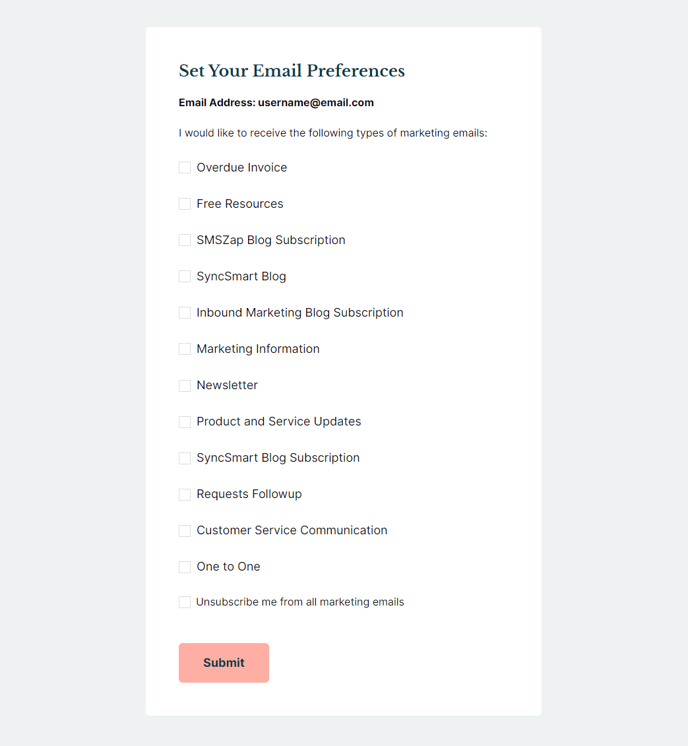
The following is a detailed listing of the styling edits made to the partial’s sections, the modules used in the sections, and field changes from the modules’ default state.
Section 1
Section Styles
Alignment and spacing > Content alignment
Full Width
Alignment and spacing > Padding
Top: 50
Right: 50
Bottom: 50
Left: 50
Background > Background color
theme.global.colors.backgrounds.base.color
Modules
Styles > Max Width
600
Styles > Borders > Radius
theme.global.borders.radius
Visible Elements
Heading, Body Text
Semantic Heading Level
1
Style Heading Level
3
Text Size
Medium
Page Type
Subscription Preferences
Form Layout > Button Position
Left
About This Feature
The System - Subscription Preferences partial provides a clean, organized interface for your website visitors to manage their email subscription settings within the Rubric theme. This partial is specifically designed for HubSpot’s system subscription preferences page, allowing users to opt in or out of different email communications from your organization.
As an educational-focused theme, Rubric handles subscription management with the same content-first approach found throughout the design. The partial combines essential page settings with clear text instructions and HubSpot’s built-in subscription management functionality, creating a seamless experience for users who want to update their email preferences.
When working with this partial in the page editor, you’ll notice the Page Settings module is configured with a maximum width of 600 pixels and rounded corners that match your theme’s global border radius settings. This constrained width ensures the subscription form remains readable and doesn’t stretch awkwardly on larger screens – particularly important for education sites where users may access preferences from various devices.
The Text Block module allows you to customize the introductory content above the subscription form. You can modify the heading and body text to match your institution’s communication style or provide specific instructions about your email types. Since this uses semantic heading level 1 but styled as heading 3, it maintains proper SEO structure while fitting visually within the page hierarchy.
The System Page Content module handles HubSpot’s native subscription functionality, with the button positioned on the left for improved readability. This layout works particularly well for education sites where clear, action-oriented design helps users quickly understand their options without confusion.
Remember that changes to this partial will update across all instances where it’s used, so test thoroughly in the page editor before publishing modifications to your subscription preferences experience.