
System - Unknown Contact
Partial for use on System - Unknown Contact template.
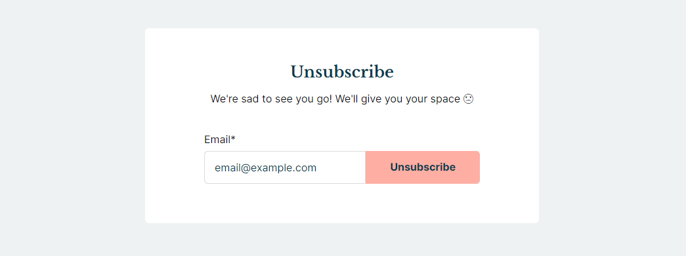
The following is a detailed listing of the styling edits made to the partial’s sections, the modules used in the sections, and field changes from the modules’ default state.
Section 1
Section Styles
Alignment and spacing > Content alignment
Full Width
Alignment and spacing > Padding > Default
Top: 50
Right: 90
Bottom: 50
Left: 90
Alignment and spacing > Padding > Mobile
Top: 50
Right: 50
Bottom: 50
Left: 50
Background > Background color
theme.global.colors.backgrounds.base.color
Modules
Styles > Max Width
600
Styles > Borders > Radius
theme.global.borders.radius
Visible Elements
Heading, Body Text
Semantic Heading Level
1
Style Heading Level
3
Text Size
Medium
Styles > Module > Spacing > Desktop > Margin
Bottom: 35
Styles > Text Alignment
Desktop: Center
Page Type
Subscription Unknown Contact
Form Layout > Single Line Form
true
How to Use This Partial
The System - Unknown Contact partial is specifically designed to handle subscription management scenarios where HubSpot cannot identify the contact attempting to access subscription preferences. This commonly occurs when users click unsubscribe links from forwarded emails or when their contact data has been modified in your HubSpot database.
When you implement this partial on your subscription pages, it provides a clean, centered interface that maintains your Rubric theme’s educational aesthetic while solving a critical user experience challenge. The partial automatically displays when HubSpot’s system cannot match an email address to an existing contact record, preventing user frustration and potential compliance issues.
Customizing the Content Experience
The Text Block module within this partial serves as your primary communication tool with unknown contacts. You can customize the heading and body text to explain why additional information is needed and reassure users about your privacy practices. Consider updating this content to match your institution’s tone and include specific instructions about contacting your communications team if users continue experiencing issues.
The System Page Content module handles the technical functionality, presenting HubSpot’s built-in unknown contact form in a streamlined single-line layout. This compact design aligns with the Rubric theme’s content-first approach, ensuring the subscription management process doesn’t overwhelm users with unnecessary visual elements.
Implementation Best Practices
Before publishing changes to this partial, test the unknown contact flow by using an email address not in your HubSpot database. The 600-pixel maximum width ensures readability across devices while the responsive padding maintains proper spacing on mobile devices. You can modify the background color through your theme settings to match seasonal branding or specific campaign requirements without affecting the partial’s functionality.