
Blog Listing - Infinite Load
A blog post listing with a load more button.
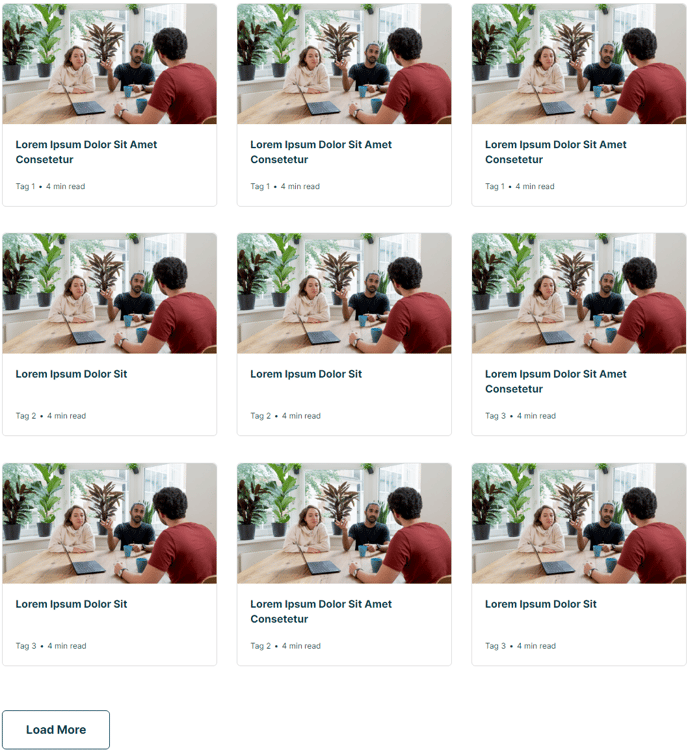
Warning: This section is meant for use on a Blog Listing page. Content will not fill in with blog posts if placed on any other page type.
View a live demo of this section here.
The following is a detailed listing of the styling edits made to the section, the modules used in the section, and field changes from the modules’ default state.
Section Styles
No styles have been applied.
Modules
Resources
Card Style
Grid
Data Source
Blog
Blog Posts > Post Type
Listing
Blog Posts > Navigation Type
Infinite Load
Blog Posts > Include
Tags, Read Time, Thumbnail
Layout > Desktop
Columns: 3
Layout > Tablet
Columns: 3
Layout > Mobile
Columns: 1
Styles > Text Tags > Divider
Bullet
Usage Guide
This Blog Listing - Infinite Load section is specifically designed for your blog listing pages, providing a clean three-column grid that encourages content discovery through its seamless loading experience. Unlike traditional pagination that breaks the reading flow, the infinite load functionality allows your visitors to continuously browse through your blog content with a simple “Load More” button click.
When you add this section through the page editor’s drag-and-drop interface, you’ll notice it automatically pulls from your HubSpot blog posts without requiring manual content curation. The section works exclusively on Blog Listing page types – attempting to use it on standard website pages, landing pages, or other templates will result in empty cards since it depends on HubSpot’s blog post data source.
The responsive design adapts intelligently across devices: your desktop and tablet visitors see the full three-column layout that showcases multiple posts simultaneously, while mobile users get a focused single-column view that’s easy to scroll through. The included metadata elements – tags, read time, and thumbnails – help visitors quickly identify content that interests them.
Consider using this section when you have a substantial blog archive and want to showcase multiple posts without overwhelming the initial page load. The bullet-style tag divider creates clean visual separation between multiple tags, maintaining readability even when posts have extensive tagging.
For optimal performance, ensure your blog posts have featured images set, as the thumbnail display is a key visual element of this section’s design. You can customize the styling further through the theme’s design manager if you need to adjust colors, spacing, or typography to match your institution’s branding guidelines.