
Course Listing
A detailed resource listing with pagination.
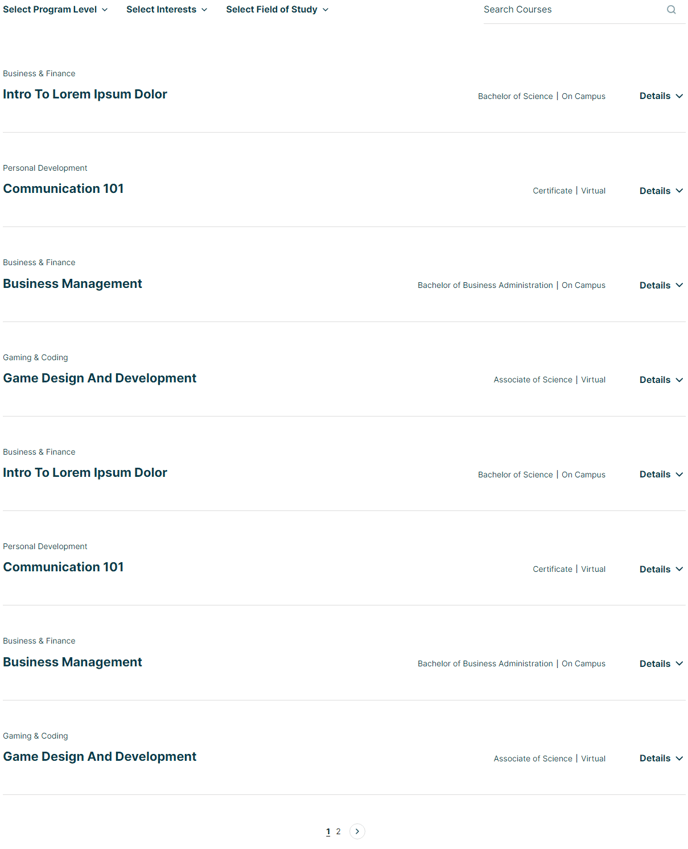
View a live demo of this section here.
The following is a detailed listing of the styling edits made to the section, the modules used in the section, and field changes from the modules’ default state.
Sections Styles
Padding
Top: theme.global.spacing.sections / 2
Bottom: theme.global.spacing.sections / 2
Modules
Listing Styles
List
List Styles
Detailed
Layout > Navigation Type
Pagination
Layout > Per Page
8
Layout > List > Desktop
Row Spacing: 50
Layout > List > Tablet
Row Spacing: 50
Styles > List > Card
Box Shadow: {animate: none}
Styles > List > Text Tags
Divider: Vertical Bar
Usage Guide
The Course Listing section is designed to showcase educational content, programs, or detailed resource collections in an organized, browsable format. This section works particularly well on program pages, course catalogs, and resource centers where visitors need to explore multiple offerings with detailed information.
When you add this section through the HubSpot page editor’s drag-and-drop interface, you’ll get a professional grid layout that displays 8 items per page by default. This pagination approach keeps your pages loading quickly while allowing visitors to browse through extensive course catalogs without overwhelming them with too much content at once.
The Detailed list style means each course entry shows more than just a title—you can include descriptions, pricing, duration, instructor information, or other key details that help visitors make informed decisions. This makes the section ideal for complex offerings where prospective students need substantial information before enrolling.
Content strategy tip: Use the filterable capabilities to let visitors sort courses by category, skill level, or department. This is particularly valuable for institutions offering diverse programs or training organizations with courses spanning multiple disciplines.
The vertical bar dividers between tags create clean separation for course categories, prerequisites, or certification types. You can customize these tags in your HubSpot content editor to highlight the most important classification information for your audience.
This section integrates seamlessly with HubSpot’s blog posts or custom content types, so you can manage course information directly in your CMS without needing external systems. The responsive design ensures your course listings look professional on all devices, with adjusted spacing that maintains readability on tablets and mobile devices.