
Form Callout
A simple callout for a form call to action.
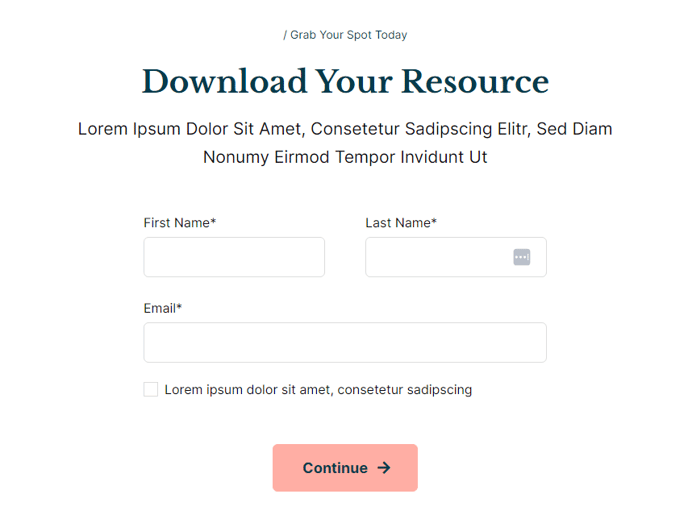
View a live demo of this section here.
The following is a detailed listing of the styling edits made to the section, the modules used in the section, and field changes from the modules’ default state.
Section Styles
No styles have been applied
Modules
Styles > Module > Max Width
750
Styles > Module > Alignment > Desktop
Center
Styles > Module > Spacing > Desktop > Padding
Bottom: theme.global.spacing.rows * 2
Styles > Alignment > Desktop
Center
Media Type
Form
Styles > Module > Max Width
500
Styles > Module > Alignment > Desktop
Center
Usage Guide
The Form Callout section provides a clean, centered layout that draws attention to your most important lead generation forms. This section works particularly well on landing pages, event registration pages, and resource download pages where you need to maximize form conversions.
When you add this section to your page through the HubSpot page editor’s drag-and-drop interface, you’ll get a two-module layout that balances compelling copy with form presentation. The Text Block module serves as your headline and value proposition space, while the Media module houses your HubSpot form. Both modules are center-aligned and constrained to specific max-widths, creating a focused reading experience that guides visitors toward form completion.
Choose this section when you need a simple, distraction-free form presentation. Unlike more complex form sections in the Rubric theme, the Form Callout eliminates visual clutter by removing background colors, borders, and competing elements. This makes it ideal for high-stakes conversion pages where every design choice should support form completion.
Content strategy tips: Keep your text block content concise and benefit-focused. Use the additional bottom padding (double the standard row spacing) to create breathing room around your form. Since the Media module is constrained to 500px width, this section works best with shorter forms—typically 3-5 fields maximum.
For educational institutions using the Rubric theme, this section excels on program inquiry pages, event registrations, and newsletter signups. The clean presentation aligns with academic environments while maintaining professional conversion optimization principles. You can easily modify the form selection within the Media module’s settings panel without affecting the section’s carefully balanced proportions.