
Hero - Recent Posts
A hero section featuring recent blog posts.
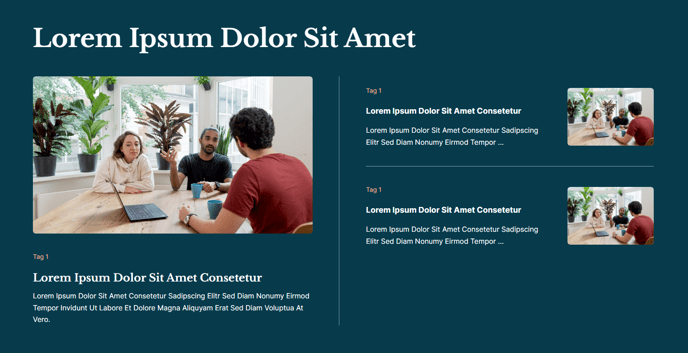
View a live demo of this section here.
The following is a detailed listing of the styling edits made to the section, the modules used in the section, and field changes from the modules’ default state.
Section Styles
Alignment and spacing > Max Width
theme.global.max_width_wide
Alignment and spacing > Padding
Top: 200
Bottom: 100
Background > Color
theme.global.colors.backgrounds.medium_dark.color
Modules
Visible Elements
Heading
Semantic Heading Level
1
Style Heading Level
1
Styles > Dark Mode
true
Visible Elements
Heading
Advanced > Custom Classes
screen-reader-text
Styles > Dark Mode
true
Card Style
Featured
Dara Source
Blog
Blog Posts > Post Type
Recent
Blog Posts > Include
Thumbnail, Tags, Summary
Blog Posts > Filters > Limit
4
Layout > Text Tags Position
Top
Layout > Desktop
Column Spacing: 60
Image Spacing: 40
Thumbnail Position: Right
Layout > Tablet
Column Spacing: 60
Image Spacing: 40
Thumbnail Position: Hide
Layout > Mobile
Thumbnail Position: Hide
Strings > Truncate Summary
85
Styles > Dark Mode
true
Styles > Module > Spacing > Desktop > Padding
Top: theme.global.spacing.rows * 2
Styles > Card > Box Shadow
Animate: None
Styles > Text Tags > Font
Size: theme.typography.body_text_small.font.size
Styles > Thumbnail > Aspect Ratio
3:2
Usage Guide
The Hero - Recent Posts section serves as a powerful landing area that immediately showcases your most current content while maintaining visual hierarchy on your page. This section works particularly well on your homepage, resource library landing pages, or as a dynamic header for blog category pages where you want to highlight fresh content to visitors.
When you add this section through the HubSpot page editor’s drag-and-drop interface, you’ll notice it automatically pulls from your site’s blog posts without requiring manual updates. The Listed Resources module handles this dynamic content retrieval, making it ideal for educational institutions or event organizations that frequently publish updates, announcements, or resources.
The Featured card style creates visual prominence for each blog post, while the responsive design ensures optimal viewing across devices. On desktop, thumbnails appear to the right of each post summary, but the configuration intelligently hides these images on tablet and mobile to prioritize readability and loading speed on smaller screens.
You can customize which blog posts appear by adjusting the filtering options in the Listed Resources module. Consider setting up blog tags in your HubSpot blog tool to create more targeted displays—for example, filtering to show only “News” or “Events” posts if this section appears on specific landing pages.
The dark background styling makes this section particularly effective when placed after lighter sections, creating visual contrast that draws attention to your recent content. The generous top padding (200px) provides breathing room, making this an excellent choice for page headers where you want to establish content hierarchy immediately upon page load.
For optimal performance, ensure your blog posts include compelling featured images and well-crafted summaries, as these elements directly impact how engaging this section appears to your site visitors.